
DTF Dye Migration on Polyester: Why Prints Turn Pink & How to Stop It (2026)
Pressed a white design on a red polyester tee and it turned pink a day later? That's dye migration. Here's why polyester does it, which garment colors are worst, and the exact films, temperatures, and blanks that stop it before it ruins a run.
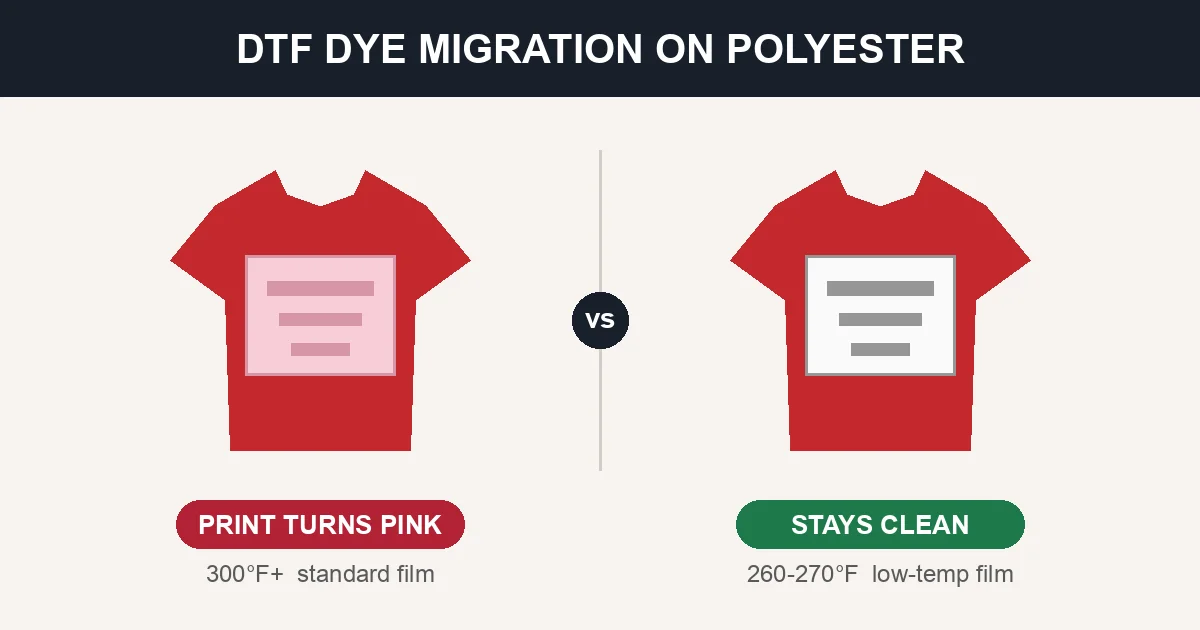
DTF Dye Migration on Polyester: Why Prints Turn Pink and How to Stop It
You pressed a crisp white design onto a red polyester tee, everything looked perfect — and a day later the white has gone pink. That is dye migration, and it is the single most frustrating failure in DTF printing because it is often invisible at the moment you peel the transfer. The damage shows up hours or even days later, after the shirt is already boxed and shipped.This guide explains exactly what dye migration is, why polyester causes it, which garment colors are the worst offenders, and — most importantly — the specific settings, films, and blanks that stop it before it ruins a production run.
What Dye Migration Actually Is
Polyester is not dyed the way cotton is. Cotton is colored with pigment or reactive dyes that bond to the fiber surface. Polyester is colored with disperse dyes, which are locked inside the plastic fiber during manufacturing.
Disperse dyes have one dangerous property: at high temperature they turn from a solid into a gas without passing through a liquid stage. This is the same sublimation reaction that makes dye-sublimation printing work — except here it works against you. When your heat press hits the shirt, the disperse dye in the garment gasses off, travels up into your transfer film, and re-deposits as color inside your white ink.
The result: your white turns pink (on red garments), purple or lavender (on royal blue and navy), peach (on orange), or a dull gray-tint (on other saturated colors). It is a chemical reaction, not a surface stain — which is why it cannot be washed out, re-pressed away, or scrubbed off. The color is now inside your ink layer.
Why It Is Often Delayed
The most dangerous part of dye migration is the delay. The sublimation reaction continues after the press opens, driven by residual heat. Migration frequently keeps developing for 24 to 72 hours as the disperse dye slowly diffuses through the print. A shirt that looked flawless at the press can be visibly pink the next morning. This is why every experienced shop presses a test sample and waits at least 24 hours before committing polyester to a production run.
Dye Migration vs. Scorching: Don't Confuse Them
These two polyester failures look different and have different causes:
| Dye Migration | Scorch / Glazing | |
|---|---|---|
| What you see | Color tint in the print — white goes pink/purple | Yellowing or shiny press box on the fabric |
| Cause | Disperse dye gassing into the ink | Polyester fibers melting/fusing |
| Location | The design (especially white/light ink) | The garment, often outside the design |
| Timing | Often delayed 24–72 hours | Immediate |
| Fixable? | No — permanent | No — largely permanent |
If your print changed color, it is migration. If the shirt changed color or got shiny, it is scorch. For scorch marks and iron burns, see our Heat Pressing Polyester Guide.
Which Garment Colors Cause Dye Migration
Migration risk is driven almost entirely by how much disperse dye is in the fabric and how unstable that dye is. Saturated, warm colors are the worst.
| Garment Color | Migration Risk | Notes |
|---|---|---|
| Red | Very High | The #1 offender. Disperse reds are the least heat-stable. |
| Royal Blue | Very High | Ghosts purple/lavender through white ink. |
| Navy | High | Common on team and school apparel. |
| Maroon / Burgundy | High | A red base, same instability. |
| Orange | High | Turns white to peach. |
| Purple | High | Bleeds readily. |
| Kelly / Bright Green | Medium–High | Blue component migrates. |
| Hot Pink / Neon | Medium–High | Fluorescent dyes are unstable. |
| Heather / Ash Gray | Medium | Depends on the dyed poly content. |
| Black / Charcoal | Low (usually hidden) | Migrates, but dark-on-dark rarely shows. |
| White / Natural | None | No disperse dye to migrate. |
Which Fabrics Migrate (and Which Don't)
- 100% polyester — highest risk, especially cheap performance tees and jerseys with heavy dye loads.
- Poly/cotton blends (50/50, 65/35) — moderate risk; the more polyester, the more migration.
- Tri-blends (cotton/poly/rayon) — moderate; the rayon and poly components can both ghost.
- 100% cotton — no dye migration. Cotton dyes do not sublimate. (Cotton has other issues, but not this one.)
- Color-locked / sublimation-blocked polyester — engineered specifically to resist migration (see below).
For rayon-family fabrics, which behave unpredictably under heat, see our Viscose Fabric DTF Printing Guide. For how press and dryer heat change a polyester garment's size rather than its color, see the guide to polyester shrinkage and heat.
The Real Cause: Heat and Time
Disperse dye starts to gas off as temperature climbs. Exact thresholds vary by dye and garment, but the pattern is consistent:
- Below roughly 270°F, most disperse dyes stay stable — migration is minimal.
- Around 280–300°F, migration begins on saturated colors.
- Above 320–350°F, migration accelerates sharply.
There is a second heat exposure people forget: anything that reheats the shirt after pressing — a hot dryer, a second press to fix a flaw, a shirt left in a hot car, or stacking hot garments straight off the press so they hold heat. All of these can trigger or worsen migration.
How to Prevent Dye Migration: The Full Playbook
There is no cure once migration happens — prevention is the entire game. Here are the methods that actually work, ranked by how much they help.
1. Use Low-Temperature DTF Film (Biggest Impact)
The most effective single change is switching to a low-temp DTF transfer designed to apply at 250–280°F instead of 300°F+. Many suppliers sell these as "low-temp," "poly," or "athletic" DTF. Applying below the migration threshold is the cleanest way to avoid the reaction entirely.
- Look for films rated for application at 260–270°F.
- Confirm the peel type — many low-temp films are cold peel. See our DTF Film Types: Matte vs Glossy & Cold Peel Guide.
2. Drop Your Press Temperature and Dwell Time
Even with standard film, pressing polyester at the low end of the adhesion window helps dramatically:
| Setting | Cotton Default | Polyester Anti-Migration |
|---|---|---|
| Temperature | 300–315°F | 270–285°F |
| Dwell time | 10–15 sec | 8–10 sec |
| Pressure | Medium-firm | Medium-firm |
| Peel | Per film | Per film (test both) |
The goal is the lowest temperature and shortest time that still gives full adhesion. Test adhesion with a stretch-and-wash sample before locking in the numbers. For the full settings reference, see our DTF Press Settings & Application Guide and heat press temperature chart for DTF.
3. Choose Color-Locked / Sublimation-Blocked Blanks
Premium athletic polyester is engineered to resist migration. Fabrics treated with PosiCharge (Sport-Tek) and similar color-lock finishes chemically stabilize the disperse dye so it does not gas off at press temperatures. If a customer needs red or royal polyester decorated, specifying a color-locked blank is the most reliable fix.
- See our Sport-Tek ST350 PosiCharge DTF Guide for the exact polyester family that resists migration.
- For team and roster orders where migration risk is high, see our Wholesale Blank Jerseys & Team Apparel Guide.
4. Add a Dye Blocker / Barrier Layer
When you must decorate a high-risk garment at higher temperature, put a barrier between the dye and your visible ink:
- Poly / anti-sublimation DTF films carry a thicker or specially formulated white layer that blocks more gas than standard film.
- Sublimation-blocker HTV (e.g., dye-blocking white-backed vinyl) can be used as an underbase in some workflows.
- A heavier white ink lay-down in the print itself provides a modest additional barrier, though it is not a complete solution on its own.
5. Cool the Garment Fast
Because residual heat keeps the reaction going, get heat out of the shirt quickly:
- Do not stack hot garments off the press — lay them flat and single until cool.
- Use a cold peel film where possible so the shirt sits and cools before handling.
- Skip the hot dryer for finished polyester when you can; residual dryer heat can trigger delayed migration.
6. Test and Wait 24–72 Hours
Non-negotiable for any new polyester blank: press one sample, then wait a full day (ideally 2–3) and inspect under good light before running the order. Migration that is invisible at the press is often obvious 24 hours later. This one habit prevents more ruined orders than any other.
Can You Fix Dye Migration After It Happens?
Short answer: no. The dye is chemically embedded inside your ink layer. The common "fixes" people try and why they fail:- Re-pressing — adds more heat, which makes migration worse, not better.
- Washing / scrubbing — the color is inside the ink, not on the surface.
- Bleaching — damages the garment and does not remove sublimated dye from the print.
- Pressing a second white layer over it — impractical and rarely masks the tint evenly.
The only real "fix" is to remake the item with the prevention steps above — low-temp film, lower temperature, a color-locked blank, or a switch to cotton. Budget for this: dye migration losses are a cost of running polyester, and the fix is upstream, not downstream.
Quick Anti-Migration Checklist
Before you press saturated polyester, run this list:
- Is there a cotton or blend alternative the customer would accept? (Zero risk.)
- Can you use a low-temp / poly DTF film (apply at 260–270°F)?
- Have you dropped the press to the lowest temperature that still adheres (around 270–285°F)?
- Is the blank a color-locked polyester (PosiCharge or similar)?
- Did you press one test sample and wait 24–72 hours before the run?
- Are finished pieces cooling flat and single, not stacked hot?
If you can answer yes to the low-temp film, low temperature, and 24-hour test, you have eliminated the large majority of migration risk.
Related DTF Troubleshooting Guides
- Heat Pressing Polyester: Temperatures, HTV, DTF & Iron Burn Repair
- DTF Prints Faded or Dull Colors: Fix
- Troubleshooting White Ink Issues
- DTF Transfer Not Sticking: Fix
- DTF Film Types: Matte vs Glossy & Cold Peel
- time and temp chart for every fabric
Frequently Asked Questions
What is dye migration in DTF printing?
Dye migration is when the disperse dye in a polyester garment turns to gas under heat-press temperatures and re-deposits inside your transfer, discoloring the ink. It most often turns white and light-colored prints pink, purple, or peach. It is a chemical reaction that happens during and after pressing, and it is permanent — the color ends up inside the ink layer, so it cannot be washed or pressed out.Why did my white DTF print turn pink on a red shirt?
The red shirt is polyester (or a poly blend) colored with disperse dye. At your press temperature, the red dye sublimated into a gas, traveled up into the white ink, and tinted it pink. Red is the most migration-prone color because disperse reds are the least heat-stable. Prevent it by using a low-temp DTF film, pressing at 270–285°F instead of 300°F+, choosing a color-locked polyester, or switching to a cotton garment.What temperature causes dye migration?
Most disperse dyes stay stable below about 270°F, begin migrating around 280–300°F, and migrate heavily above 320–350°F. Standard DTF cotton settings (roughly 300–315°F) sit in the danger zone for polyester, which is why polyester needs a lower application temperature or a low-temp film.Does dye migration happen on cotton?
No. Cotton is colored with pigment and reactive dyes that do not sublimate, so 100% cotton does not migrate. Only polyester, poly blends, and some rayon/tri-blends carry disperse dye that gasses off under heat. When migration risk is high and the customer is flexible, switching to cotton eliminates the problem entirely.How do I stop dye migration on polyester?
Use the lowest-heat approach that still adheres: a low-temp / poly DTF film applied at about 260–270°F, or standard film pressed at 270–285°F for 8–10 seconds. Choose color-locked (PosiCharge-style) polyester for saturated colors, cool finished pieces flat instead of stacking them hot, and always press a test sample and wait 24–72 hours before running the full order.Can dye migration be fixed after it happens?
No. The sublimated dye is embedded inside your ink layer, so it cannot be washed, scrubbed, bleached, or pressed out — and re-pressing adds heat that makes it worse. The only remedy is to remake the item using prevention steps: a lower press temperature, a low-temp or poly film, a color-locked blank, or a cotton garment.Why does dye migration show up a day later?
Residual heat keeps the sublimation reaction going after the press opens. Disperse dye continues diffusing through the print for 24–72 hours, so a shirt that looked perfect at the press can be visibly discolored the next day. This delay is why testing a sample and waiting at least 24 hours before production is essential for any new polyester blank.Is dye migration the same as scorching?
No. Dye migration is a color change in your print (white goes pink/purple) caused by disperse dye gassing into the ink. Scorching is a change in the fabric — yellowing or a shiny glazed press box — caused by polyester fibers melting. Migration is often delayed; scorch is immediate. Both are largely permanent, so prevention matters for each.Which shirt colors are safe from dye migration?
White and natural garments have no disperse dye to migrate, so they are completely safe. Black and charcoal migrate but the tint is hidden by the dark base. The high-risk colors are red, royal blue, navy, maroon, orange, and purple — all saturated colors that should be tested (and ideally decorated with low-temp film or on color-locked blanks) before a production run.Running a lot of polyester team and athletic orders? See our Wholesale Blank Jerseys & Roster Apparel Guide and Sport-Tek ST350 PosiCharge DTF Guide for the color-locked blanks that resist migration.
New to polyester blanks? What does polyester feel like covers how the common fabric types differ.
Tags
About the Author
DTF Database Founder
Darrin DeTorres has over 10 years of experience in the print industry, specializing in screen printing, sublimation, embroidery, HTV, and DTF printing. He runs Notice Me Marketing and Media, a custom apparel production company that prints thousands of shirts per month.
More from Troubleshooting
Explore DTF Database
Browse and compare 20+ verified DTF printer models by price, features, and specifications.
Read moreCalculate your per-print costs, profit margins, and ROI for DTF printing.
Read moreBrowse verified DTF suppliers for ink, film, powder, and equipment.
Read moreFind DTF transfer suppliers shipping to your state, with verified turnaround times.
Read moreMetro-level DTF supplier guides for Los Angeles, NYC, Dallas, Houston, and more.
Read moreStep-by-step guide to the DTF printing process with temperatures and troubleshooting.
Read more