
Siser Romeo vs Juliet: 24" vs 12" — Which to Buy
The Romeo cuts 24" wide, the Juliet 12". Both run 800gf of force and Leonardo Design Studio. Which one fits your shop, and when the extra width pays for itself.
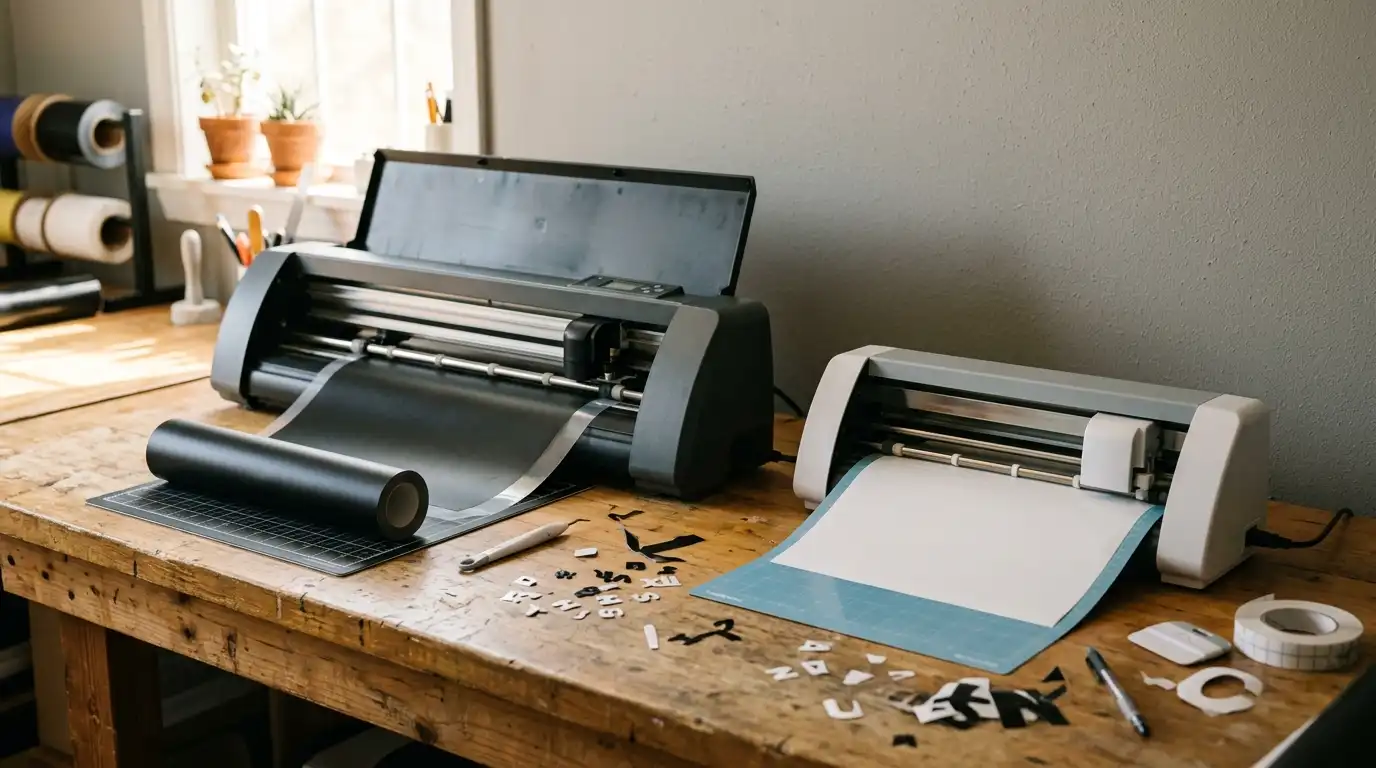
Siser Juliet vs Romeo: HTV Vinyl Cutter Review (2026)
Siser is best known for EasyWeed heat transfer vinyl, but the company also sells two desktop vinyl cutters under its own brand: the Juliet (12-inch) and the Romeo (24-inch). Both target HTV-focused decorators who want a Siser-tuned alternative to a Cricut Maker, Silhouette Cameo, or commercial Roland. This review pulls the verifiable specs from Siser North America and authorized retailers, lays out who each model fits, and is explicit about one thing up front: HTV cutters do not cut DTF transfers.For the broader method context, see the HTV vs sublimation vs DTF comparison guide and the heat transfer printing methods overview.
Siser's Cutter Line at a Glance
Siser's lineup is two models: a 12-inch desktop machine for craft and small-shop users (Juliet) and a 24-inch wide-format machine for shops running rolled HTV (Romeo). Both share Leonardo Design Studio software, a built-in registration camera, and 800 grams of cutting force, according to Siser. The difference is format size.
Both machines cut self-adhesive vinyl, heat transfer vinyl, paper, cardstock, and stencil material. Neither cuts a finished DTF transfer, covered separately below.
Siser Juliet: 12-Inch Desktop Cutter
The Juliet is positioned against the Cricut Maker and Silhouette Cameo as a 12-inch desktop cutter, but with a manufacturer-claimed feature set targeted more at HTV decorators than general crafters.
Verified specs (per Siser and authorized retailers)
- Cutting width: 12 inches with mat; up to 13.5 inches material width without mat (per retailer listings sourcing Siser data)
- Maximum cutting force: 800 grams
- Cutting precision: 0.01 mm, per Siser
- Registration system: built-in camera that reads registration marks for print-and-cut workflows
- Software: Leonardo Design Studio (included free with the cutter), connecting via USB or Wi-Fi
- Connectivity: USB and Wi-Fi (Windows and Mac compatible per the Amazon and Siser listings)
- Warranty: 1-year limited parts and service warranty in North America (Siser North America), per Siser's published warranty page
- Retail price: Siser does not publish a fixed MSRP on every page; authorized retailer pricing has been observed in the mid-hundreds (one retailer was observed at $395 on sale at the time of writing). Confirm current pricing with an authorized dealer before purchase.
Weight, footprint, and motor wattage are not reproduced here because they were not cleanly published in plain text on the manufacturer's indexed product pages. An authorized dealer can supply the spec sheet.
Pros
- 800 grams of force is high for a 12-inch desktop machine, which matters for thicker specialty vinyls (glitter, flock, holographic, stencil film).
- Built-in registration camera for print-and-cut. Siser positions this as more accurate than optical-eye sensors used on some competing cutters.
- Leonardo Design Studio included. No subscription upgrade needed to unlock SVG import or production features. Wi-Fi and USB supported.
- HTV-focused tuning. Siser makes the HTV; the cutter is tuned to cut Siser EasyWeed cleanly.
Cons
- 12-inch deck is too narrow for 15-inch HTV rolls (the standard small-shop format). Decorators must slit rolls down or use sheets.
- Smaller third-party ecosystem than Cricut.
- Leonardo Design Studio has a learning curve for users coming from Cricut Design Space.
Who the Juliet fits
Single-operator HTV shops, home-based decorators, and EasyWeed power users who want a cutter tuned to Siser material with print-and-cut built in. A credible step up from a Cricut for someone whose volume has outgrown a craft machine but who is not yet running 24-inch rolls.
Siser Romeo: 24-Inch Wide-Format Cutter
The Romeo is essentially the Juliet's 24-inch sibling. Same software, same camera concept, same 800-gram force, scaled up to a width that matches commercial 15-inch and 20-inch HTV rolls and even goes wider.
Verified specs (per Siser and authorized retailers)
- Cutting width: 24 inches; supports rolled material up to roughly 60 cm wide, per Siser's product page and authorized retailer listings
- Maximum cutting force: 800 grams (per Siser)
- Cutting speed: up to 600 mm/s, per Siser's product page
- Cutting precision: 0.01 mm, per Siser
- Registration system: built-in camera (same approach as Juliet) for print-and-cut
- Software: Leonardo Design Studio included; connects via USB or Wi-Fi
- Roll holder accessory is included with the standard configuration, per the Amazon and Siser listings
- Warranty: 1-year limited parts and service warranty in North America (Siser North America), per Siser's published warranty page; EU customers receive a 2-year limited warranty per the same page
- Retail price: Siser does not publish a fixed MSRP that this review can confirm in plain text. Confirm current pricing with an authorized dealer.
Weight, footprint, and stand dimensions are not reproduced here because they were not cleanly published in plain text during fact-checking. An authorized dealer can supply the full spec sheet.
Pros
- 24-inch deck runs full-width 15-inch and 20-inch HTV rolls without slitting and handles back prints, oversize numbers, and stencil film.
- Same 800-gram force and camera registration as Juliet.
- Roll holder included in the standard configuration, per Siser and Amazon listings.
- Production-grade speed. A 600 mm/s top cutting speed (per Siser) matters when running hundreds of names and numbers.
Cons
- Footprint. A 24-inch cutter on a stand needs dedicated bench or floor space.
- Higher price than Juliet. Confirm with an authorized dealer; Siser does not publish a fixed MSRP.
- Overkill for hobby use.
Who the Romeo fits
Growing apparel shops, team-uniform decorators, and producers running rolled HTV at 15-inch or 20-inch widths who want full roll width on the cutter. Also a fit for shops doing larger-format stencil and signage cutting alongside HTV.
Side-by-Side Comparison
| Spec | Siser Juliet | Siser Romeo |
|---|---|---|
| Cutting width | 12 in | 24 in |
| Max material width | up to 13.5 in (no mat) | up to ~60 cm rolled |
| Max cutting force | 800 gf | 800 gf |
| Cutting precision | 0.01 mm | 0.01 mm |
| Cutting speed | not stated in the same form by Siser | up to 600 mm/s |
| Registration | built-in camera | built-in camera |
| Software included | Leonardo Design Studio | Leonardo Design Studio |
| Connectivity | USB, Wi-Fi | USB, Wi-Fi |
| Roll holder | not included by default | included |
| Warranty (NA) | 1 year limited | 1 year limited |
| Best for | single-operator HTV, home-based | growing shops, rolled HTV, team uniforms |
All specs in the table are stated by Siser or authorized retailers. Where a value was not cleanly published, the table says so rather than guessing.
Cricut Maker and Silhouette Cameo as Alternatives
Most decorators evaluating the Juliet also look at a Cricut Maker (12-inch consumer cutter, Cricut Design Space) or a Silhouette Cameo (12-inch, Silhouette Studio). Both are mature platforms with large accessory ecosystems.
This review will not list cutting force or blade speed for the competing machines because their manufacturers' published spec sheets were not re-verified for this article. The general tradeoffs decorators describe:
- Cricut Maker / Explore — easiest beginner experience, biggest accessory ecosystem. Cricut Access subscription unlocks template libraries.
- Silhouette Cameo — more open file format support, no subscription required for SVG import.
- Siser Juliet — narrower ecosystem, but tuned for HTV with camera registration and Leonardo Design Studio at no subscription cost.
HTV Workflow: Design, Cut, Weed, Mask, Press
The Juliet and Romeo both fit into the standard HTV workflow:
- Design the artwork in Leonardo Design Studio, Illustrator, Affinity, or Inkscape (anything that exports SVG).
- Mirror horizontally. HTV is cut adhesive-side down, so the design must be flipped before cutting. Most common rookie mistake.
- Cut with blade depth and force set for the specific Siser HTV product (EasyWeed, Glitter, Holographic, etc.).
- Weed the excess vinyl with a weeding hook, leaving only the design on the carrier.
- Apply transfer mask if the design is multi-piece; single-block designs do not need it.
- Heat press at 305-320F for 10-15 seconds with firm pressure, confirming Siser's printed instructions for the specific HTV product. The HTV vs sublimation vs DTF guide and the iron-on letters and decals guide cover press settings.
- Peel warm or cold per the manufacturer's spec.
- Wait 24 hours before the first wash for full adhesive cure.
A reliable heat press is the second half of any HTV setup; the best heat press buying guide covers clamshell vs. swing-away and budget tiers.
Who the Juliet vs Romeo Fits
- Choose the Juliet if the shop is single-operator, runs HTV in sheets or 12-inch material, mostly decorates names, numbers, and small designs, and wants a Siser-tuned alternative to a Cricut Maker.
- Choose the Romeo if the shop runs rolled HTV at 15-inch, 20-inch, or wider, produces team uniforms or larger back-print designs, or wants room to grow without buying a second cutter in a year.
- Choose neither if the work is photographic, gradient-heavy, or full-color on dark cotton. That is DTF territory, not HTV cutter territory. See the HTV vs sublimation vs DTF comparison for the method picker.
Frequently Asked Questions
What's the difference between Siser Juliet and Romeo?
The Juliet is a 12-inch desktop cutter; the Romeo is a 24-inch wide-format cutter. Both share 800-gram cutting force, 0.01 mm precision, built-in registration camera, and Leonardo Design Studio, per Siser. The Romeo adds support for rolled material up to roughly 60 cm, a published 600 mm/s top speed, and an included roll holder.Is the Siser Juliet good for beginners?
Yes, with one caveat. The hardware is forgiving (high force, camera registration, Wi-Fi or USB). The caveat is software: Leonardo Design Studio is more production-oriented than Cricut Design Space, so a beginner with no vector-software experience faces a steeper first day than on a Cricut. Anyone who already uses Illustrator, Inkscape, or Affinity will be productive on the Juliet quickly.Can the Siser Romeo cut DTF transfers?
No. DTF transfers are not a cut-from-sheet medium. A DTF transfer is a printed PET film with hot-melt adhesive powder already cured to the back; the entire transfer is heat-pressed onto the garment as one piece and the carrier film is peeled. There is no weeding step and no cut path. HTV cutters like the Juliet and Romeo cut single-color HTV from a sheet or roll. The two technologies do not overlap. See the complete DTF printing guide.What software comes with Siser cutters?
Leonardo Design Studio is included with both the Juliet and Romeo at no extra cost, per Siser. It connects over USB or Wi-Fi and is Windows and Mac compatible per the Siser and authorized retailer listings. No monthly subscription is required.Tags
About the Author
DTF Database Founder
Darrin DeTorres has over 10 years of experience in the print industry, specializing in screen printing, sublimation, embroidery, HTV, and DTF printing. He runs Notice Me Marketing and Media, a custom apparel production company that prints thousands of shirts per month.
More from Equipment Reviews
Explore DTF Database
Browse and compare 20+ verified DTF printer models by price, features, and specifications.
Read moreCalculate your per-print costs, profit margins, and ROI for DTF printing.
Read moreBrowse verified DTF suppliers for ink, film, powder, and equipment.
Read moreFind DTF transfer suppliers shipping to your state, with verified turnaround times.
Read moreMetro-level DTF supplier guides for Los Angeles, NYC, Dallas, Houston, and more.
Read moreStep-by-step guide to the DTF printing process with temperatures and troubleshooting.
Read more