
How to Upsell Print Locations: Sleeves, Backs & Sizing Tags
A profit playbook for DTF shops: how sleeve prints, back prints, and custom sizing tags add $4 to $10 of margin per shirt with almost no extra labor, plus the placement specs and pricing structure that make customers say yes.
How to Upsell Print Locations and Make More Per Shirt
The single most profitable change a DTF shop can make to its order form is not raising the front-print price. It is selling a second, third, or fourth print location on the same shirt. A left-chest logo plus a full back, plus a sleeve hit, plus a custom sizing tag turns a $12 single-location job into a $24 to $30 finished retail-grade shirt — and the marginal cost on the extra locations is pennies of film, ink, and powder. The labor barely moves: the press is already hot, the shirt is already on the platen, the customer is already buying.
This guide covers four things in order: the unit economics of upselling print locations, the placement and sizing specs for sleeves and backs, how to bundle a custom sizing tag into every order, and the pricing structure and order-form layout that gets customers to say yes to all of it.
The Unit Economics of a Second Print Location
The math on additional print locations is unusually friendly. A typical front-only DTF tee at retail looks something like this:
- Blank tee: $3.50
- DTF transfer (10x12 front print): $1.20 in film, ink, powder
- Application labor: 30 to 60 seconds of press time
- Retail price: $14 to $18 for a single-color simple front print, $20 to $25 for a fuller-coverage front print
Adding a second location to that same shirt looks like this:
- Second transfer (4-inch sleeve hit): $0.20 to $0.40 in additional consumables when gang-sheeted with the front print
- Additional labor: 15 to 30 seconds of press time on the same hot press, same shirt
- Retail upcharge: $3 to $7 depending on the location and the size
The marginal cost on that second location is in the cents. The retail upcharge is in the single dollars. On a 50-shirt order, a $5 sleeve upcharge adds $250 to the invoice with maybe $20 in additional consumable cost and 15 minutes of additional press time. The gross margin on the extra location is in the 90% range — substantially higher than the front-print margin, because the fixed costs of staging the order, handling the blanks, and folding the finished goods are already absorbed by the first location.
The shops that build the highest-margin DTF businesses are the ones that treat the second, third, and fourth print location as the default, not the upsell.
Sleeve Prints — The Easiest Upsell on the Order Form
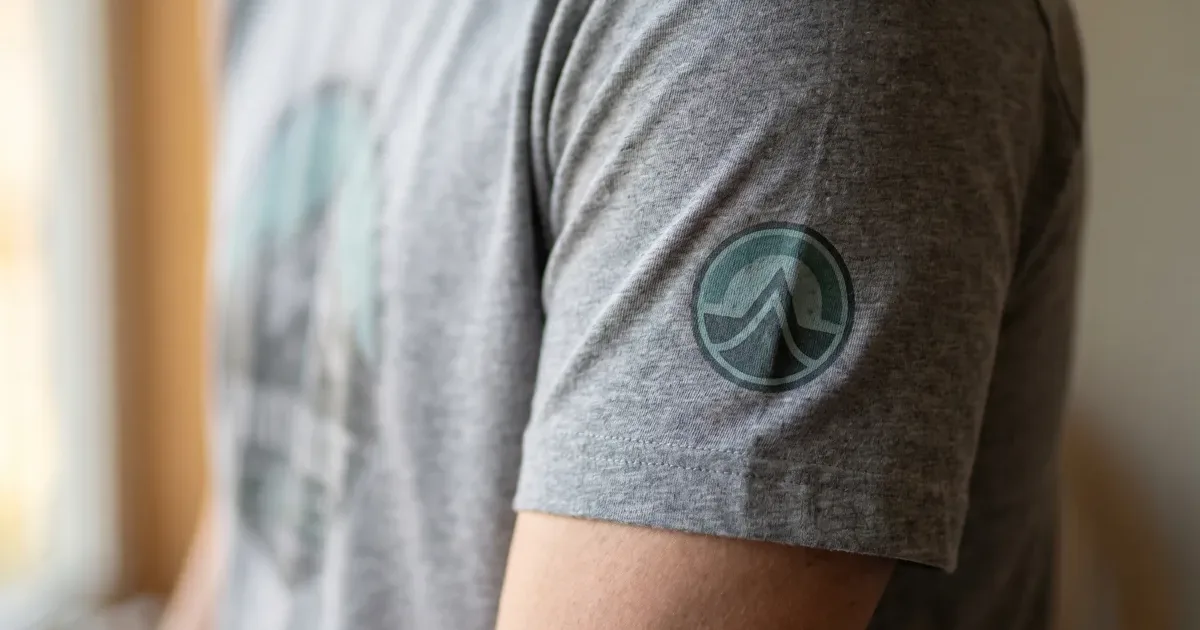
Sleeves are the highest-conversion second location for one reason: they make the shirt look like a finished retail product. A left-chest logo alone reads as "company shirt." A left-chest logo plus a sleeve hit reads as "brand." Customers feel the difference and pay for it.
Standard Sleeve Print Placements
Three sleeve placements cover almost every order:
- Upper sleeve (most common). The print runs across the outer face of the upper sleeve, roughly 4 to 6 inches down from the shoulder seam. Typical artwork width: 3 to 4 inches.
- Lower sleeve / cuff. The print sits 1.5 to 2 inches up from the cuff edge, oriented either along the arm (vertical) or perpendicular to it. Typical artwork width: 2.5 to 3.5 inches.
- Down-arm vertical. The print runs the length of the upper sleeve in vertical orientation. Best for one-word brand marks or narrow logos. Typical artwork length: 6 to 8 inches.
The upper sleeve placement is the most forgiving and the easiest to align consistently. It is also the most visible when the wearer is standing with their arms at their sides, which is the angle most customers picture when imagining how the shirt will look.
Sleeve Print Sizing
A sleeve print should fit comfortably within the outer-facing flat area of the sleeve when the shirt is lying flat on the press. Going larger than 4 inches wide on a standard adult tee risks wrapping around the seam, which presses unevenly and shows up as faded or cracked edges after a few washes. For youth sizes, scale down to 2.5 to 3 inches.
The practical workflow: design the sleeve artwork at the largest size that fits a small (the smallest adult size in the order), and use that single artwork file across the whole size run. Trying to scale sleeve art to garment size adds complexity to the gang sheet without a meaningful visual payoff.
Sleeve Press Settings
The sleeve is a single layer of fabric over an open platen — the easiest pressing situation in the entire shop. Standard DTF settings apply: 300 to 320°F for 8 to 10 seconds, peel per the film manufacturer's spec, optional 5-second post-press through parchment paper for hand feel. The DTF Database DTF press settings and transfer sizes guide covers the application mechanics in more detail.
Pricing the Sleeve Upcharge
Most shops price a sleeve hit at $3 to $5 per shirt as an add-on to a primary print. Some shops bundle the sleeve into a flat "two locations" package price (e.g., front + sleeve = $4 over front-only), which simplifies the order form and removes the per-location decision from the customer.
Back Prints — The Highest-Visibility Location in the Shop
The back of a shirt is the largest unbroken canvas on a t-shirt or hoodie. It is also the location that does the most marketing work for the wearer's organization — sports teams, churches, family reunions, fundraising events, and corporate sponsors are nearly always identified by what is on the back of the shirt, not the front.
Standard Back Print Placements
Three back-print placements cover the catalog:
- Full back / large back. The print is centered horizontally and starts roughly 3 to 4 inches below the collar seam. Typical artwork width: 11 to 14 inches on adult sizes. This is the standard "team back" placement — large logo, school name, tournament info, sponsor logos.
- Back yoke / upper back. A smaller print sits centered horizontally, just below the collar seam, in the upper-back area only. Typical artwork width: 4 to 6 inches. Common for brand marks and small institutional logos that work as a counterpoint to a front-chest design.
- Lower back / hem print. A small horizontal print sits 2 to 3 inches up from the bottom hem, centered or offset to one side. Typical artwork width: 3 to 4 inches. Common for streetwear-style branding and event-tee details.
The full-back placement is the highest-margin upsell on the form because it consumes a lot of film and supports the highest retail upcharge, but the labor is identical to a front print. The yoke and lower-back placements are smaller margin-per-shirt but pair beautifully with a front design and rarely get pushback on price.
Back Print Sizing
Full-back artwork on adult sizes typically runs 11 inches wide on a small or medium, 12 inches on a large, and 13 to 14 inches on extra-large and up. Most shops standardize on a single 12-inch-wide artwork file across all adult sizes — the difference between 11 and 13 is not visually meaningful at arm's length, and a single file simplifies the gang sheet.For youth sizes, scale full-back artwork to 9 to 10 inches wide. Yoke prints run 4 to 6 inches wide. Lower-back prints run 3 to 4 inches wide.
Pricing the Back Upcharge
Back-print pricing varies by size:
- Full back (11 to 14 inches): $5 to $10 per shirt as an add-on to a primary print. Some shops price the full back as a standalone primary location at the same price as a front print.
- Yoke / small upper back (4 to 6 inches): $3 to $5 per shirt.
- Lower-back / hem print (3 to 4 inches): $3 to $4 per shirt.
A 50-shirt order with a left-chest logo plus a full back at a $7 upcharge adds $350 of revenue with about $15 to $25 in additional consumable cost. A team-uniform program that adds a full-back name-and-number on every shirt is, on a margin basis, the most profitable single product a DTF shop can run.
Custom Sizing Tags — The Always-Upsell
The custom sizing tag is the smallest upsell on the order form and, for shops that figure out how to bundle it, the most reliably profitable. The cost is pennies. The upcharge is dollars. The customer perceives a finished, brand-owned product instead of a decorated blank.
The DTF Database custom sizing tags and tear-away brand ranking guide covers the FTC labeling requirements, the tear-away blank rankings, and the application methods in detail. The relevant points for an upsell program:
- A custom inside-collar tag is a 2.5-inch by 1.25-inch DTF transfer that gang-sheets onto the same film as the rest of the order at near-zero marginal cost.
- Bella+Canvas, Next Level, and District blanks ship with tear-away tags across most of their catalogs, which makes the original tag come out cleanly without a seam ripper.
- Application is 8 to 10 seconds at 300 to 320°F on a mini heat press (or a regular press with a small pillow).
- The legal requirements (fiber content, country of origin, care, manufacturer identity) typically live on a separate side-seam care label or get printed onto the same custom tag depending on layout.
Pricing the Custom Tag Upsell
Most shops price a custom inside-collar tag at $2 to $4 per shirt. The marginal cost is roughly $0.05 to $0.15 per tag in DTF transfer. The labor adds 10 to 15 seconds per shirt for the press, plus the up-front time to set up the tag artwork — typically 15 to 30 minutes for a brand's first order, then zero for every order after.
When the Tag Makes the Most Sense
Three customer types nearly always say yes to a custom tag upsell:
- Private-label brands. Apparel brands that are selling their own product at retail need a brand-owned tag to look like a finished good. This is the always-yes category.
- Schools, teams, and event programs. A custom tag turns a Bella+Canvas 3001 with a school logo into a school-branded product, which justifies a higher retail price at the school store and adds revenue for the program. The tag is often funded by the program itself, not the buyer.
- Corporate and uniform programs. Companies that order shirts for staff want the inside of the shirt to match the outside. A custom tag with the company logo or the campaign name is a small upcharge that signals seriousness about the brand.
For consumer one-off custom orders (family reunions, single birthday tees, single-gift orders), the tag upsell typically does not convert and is usually left off the order form.
Bundling the Locations into a Pricing Structure
The shops that sell the most second-and-third locations are the ones that build the bundles into the order form rather than asking the customer to opt in to each upsell separately. Three bundle structures cover most of the market:
Bundle Structure 1: Per-Location Pricing
The simplest structure. A primary print is priced at $X. Each additional location is priced at a flat add-on:
| Location | Add-on Price |
|---|---|
| Front (primary) | $14 |
| Full back | +$7 |
| Sleeve | +$4 |
| Custom inside tag | +$3 |
The customer sees each line and chooses what to add. The advantage is transparency. The disadvantage is that customers default to the cheapest option and skip locations that they would have paid for if they had been bundled.
Bundle Structure 2: Tiered Packages
The order form offers three tiers, each with a name that signals the level of finish:
- Basic ($14): front-only print
- Premium ($20): front + back print
- Brand-Owned ($25): front + back + sleeve + custom inside tag
The tier names do the selling. "Brand-Owned" sounds like the option a serious brand would pick, even if the customer originally walked in for a single front print. Conversion to the higher tiers in tiered structures runs noticeably better than per-location pricing for the same effective price points.
Bundle Structure 3: Default-On with Discount for Removal
An aggressive structure used by some private-label-focused shops. The default order includes front + back + sleeve + custom tag at a single bundled price. Removing locations earns a discount, but the customer has to actively opt out. This structure converts the highest, but it requires an order workflow that supports active-removal language without feeling pushy. Best suited for shops with a proposal-and-quote sales motion rather than a self-service order form.
Production Workflow — One Gang Sheet, All the Locations
The operational unlock that makes multi-location upselling profitable is gang-sheet design. A single 22-inch by 24-inch DTF gang sheet can carry the front prints, back prints, sleeve prints, and custom tags for an entire 50-shirt order on one film. The press time is the only labor cost that scales with location count — and even that scales linearly with no setup overhead between locations on the same shirt.
A typical multi-location order workflow:
- Design all locations together. The artwork files for the front, back, sleeve, and tag live in the same project folder, sized for the final print dimensions.
- Build a single gang sheet. All artwork for the order is laid out on one 22-inch-wide DTF film. The DTF Database gang sheet optimization guide covers layout strategies in detail.
- Print, powder, cure as one job. No additional setup between artworks within the same gang sheet.
- Cut the sheet by location. A self-healing mat and a rotary cutter or a small electric trimmer separates the front prints, back prints, sleeves, and tags into stacked piles.
- Press each shirt across all locations. The shirt goes on the press once for the front, once for the back (if the press is large enough to cover the full-back area), once for the sleeve, and once for the tag. Total press time per shirt: roughly 60 to 90 seconds across all four locations.
For shops running this workflow at volume, a second pressing station — even a smaller secondary press dedicated to sleeves and tags — pays for itself quickly. The main press handles fronts and backs while the secondary press handles sleeves and tags in parallel, which can roughly halve the total press time per shirt on multi-location orders.
For sourcing the films, powders, and gang-sheet services that support this workflow, the DTF Database supplier directory covers transfer printers, gang-sheet specialists, and equipment dealers across the U.S. Suppliers like Heat Transfer Warehouse, Howard Custom Transfers, and Transfer Express all offer gang-sheet programs that support multi-location print runs at meaningful discounts versus single-location pricing.
How to Sell the Upgrade — Order Form Language That Converts
The shops that convert the most upsells use specific language in three places: the order form, the proposal, and the post-order confirmation.
On the Order Form
- Show the multi-location bundle as the default selected option, not as an opt-in checkbox.
- Use visual mockups of each tier so customers can see the difference between front-only and front + back + sleeve + tag.
- Frame additional locations as "finished retail look" or "brand-owned", not as "upgrades" or "add-ons."
In the Proposal
- Lead with the Brand-Owned tier (or whatever the multi-location tier is named) and present the lower tiers as alternatives.
- Show per-shirt margin uplift for the customer's program, not just the per-shirt price. A school store buying 200 shirts at a $5 retail uplift earns $1,000 more on the same order.
- Include a mockup with the custom inside tag visible. Customers who have not done private-label work before often do not realize the tag is even an option.
In the Post-Order Confirmation
- Confirm what was ordered with a photo of the in-progress shirt that shows all the locations once production is underway. This produces referrals more reliably than any single piece of marketing collateral, because customers share the photos.
Frequently Asked Questions
What is the highest-margin print location upsell?
The full back is the largest absolute-dollar upsell ($5 to $10 per shirt). The custom sizing tag is the highest-margin-as-a-percentage upsell (pennies of cost, $2 to $4 retail). Sleeves are the highest-conversion upsell because customers feel the difference between a chest-only shirt and a chest + sleeve shirt immediately.How much should a sleeve print cost?
Most shops price a sleeve hit at $3 to $5 per shirt as an add-on to a primary front print. Some shops bundle front + sleeve into a single multi-location price ($16 to $18 for the bundle) which converts better than asking the customer to opt in to the sleeve separately.What size should a full-back print be?
Full-back artwork on adult sizes typically runs 11 to 14 inches wide. Most shops standardize on a 12-inch artwork file across all adult sizes — the difference between 11 and 13 inches is not visible at arm's length, and a single file simplifies the gang sheet. Youth full-backs scale to 9 to 10 inches wide.Can the sleeve, back, and tag all gang-sheet on the same DTF film?
Yes. A single 22-inch-wide DTF gang sheet routinely holds the front prints, back prints, sleeve prints, and custom tags for an entire small-to-mid order. The DTF Database gang sheet optimization guide covers layout strategies and waste minimization in detail.Should the order form default to single-location or multi-location pricing?
For private-label, school, team, and corporate programs, default to the multi-location bundle. For consumer one-off orders (family events, single-gift tees), default to single-location with the multi-location bundle visible as an upgrade. The customer profile predicts the right default better than the product does.How long does multi-location pressing add to per-shirt labor?
A front + back + sleeve + tag press cycle runs roughly 60 to 90 seconds of total press time per shirt versus 30 to 45 seconds for a front-only shirt. With a second press running sleeves and tags in parallel, the total per-shirt cycle drops to roughly 45 to 60 seconds — roughly the same as a front-only shirt without the parallel station, but with three to four times the revenue per shirt.What is the minimum order size that justifies a custom inside tag?
For shops that already gang-sheet their orders, the marginal cost of adding tags is small enough that there is no real minimum. For shops billing per-design setup time, a 12 to 25 piece minimum on the first order (covering the artwork setup time) is common; reorders on the same artwork have no minimum.Conclusion
The DTF shop that prices a single front print at $15 and stops there is leaving the most profitable square inches on the shirt unpriced. A sleeve hit, a full back, and a custom inside tag layered onto the same shirt move the order from $15 to $24 to $30 with marginal cost in the cents and marginal labor in the seconds. The customer perceives a finished retail product instead of a decorated blank — and pays accordingly.
The operational unlock is gang-sheet design that puts every location for every shirt in the order onto a single film. The pricing unlock is a tiered or default-on bundle structure that puts the multi-location option in front of the customer instead of asking them to opt in one location at a time. The brand unlock is the custom inside sizing tag — the smallest piece of artwork in the order doing the most work to make the shirt look like a brand-owned good.
For sourcing the films, gang sheets, and neck-label transfers that make this workflow profitable, the DTF Database supplier directory covers the transfer printers, gang-sheet specialists, and equipment dealers that support multi-location decoration at scale. For the application mechanics on each location, the DTF press settings and transfer sizes guide covers temperature, time, and pressure across substrates. And for the tear-away blank ranking that makes the inside-collar tag a clean upsell, the custom sizing tags and tear-away brand ranking guide covers Bella+Canvas, Next Level, District, and the rest of the catalog one blank at a time.
Tags
About the Author
DTF Database Founder
Darrin DeTorres has over 10 years of experience in the print industry, specializing in screen printing, sublimation, embroidery, HTV, and DTF printing. He runs Notice Me Marketing and Media, a custom apparel production company that prints thousands of shirts per month.
More from Business Tips
Section 301 forced-labor tariffs of 10% to 12.5% replaced the Section 122 tariff on July 24, 2026. How they hit blank tees, DTF film and ink, who is exempt.
Explore DTF Database
Browse and compare 20+ verified DTF printer models by price, features, and specifications.
Read moreCalculate your per-print costs, profit margins, and ROI for DTF printing.
Read moreBrowse verified DTF suppliers for ink, film, powder, and equipment.
Read moreFind DTF transfer suppliers shipping to your state, with verified turnaround times.
Read moreMetro-level DTF supplier guides for Los Angeles, NYC, Dallas, Houston, and more.
Read moreStep-by-step guide to the DTF printing process with temperatures and troubleshooting.
Read more