
Cricut StickerPix: Specs, Price, vs. UV DTF Stickers
Cricut StickerPix Print + Cut is $299 and Print is $169. Sheet sizes, cartridge yields, cost per sheet, and how it compares with UV DTF stickers.
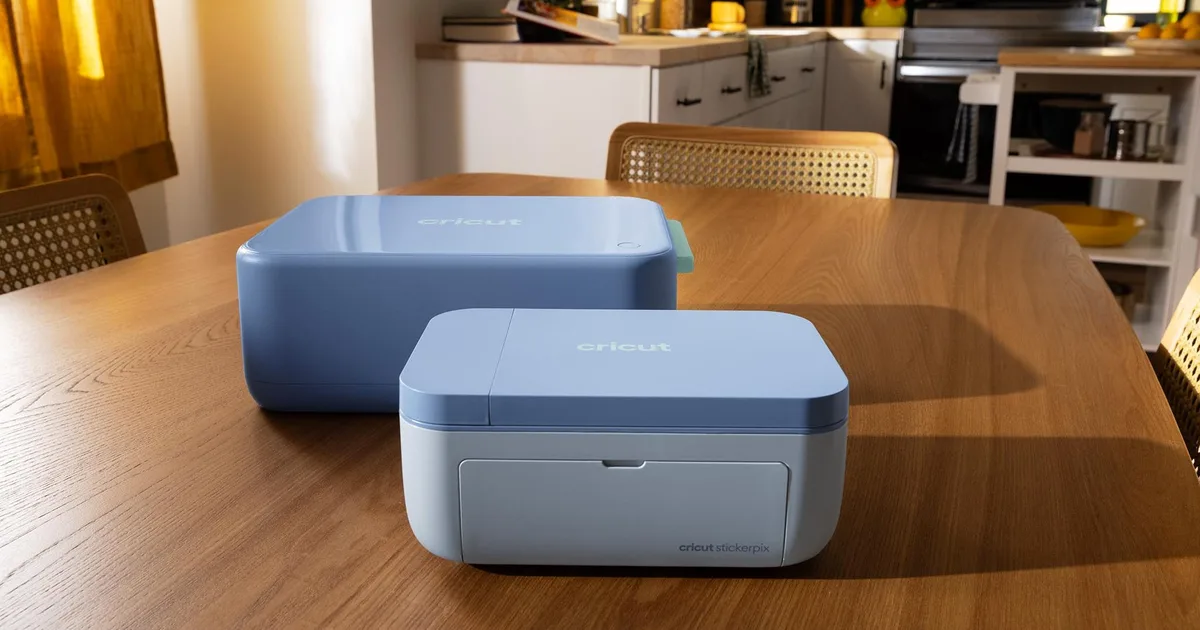
Image: Cricut
Specs at a glance
| StickerPix Print + Cut | StickerPix Print | |
|---|---|---|
| Launch price | $299 (Essential Bundle) | $169 (Essential Bundle) |
| Print method | Thermal dye-sublimation, 300 dpi | Thermal dye-sublimation, 300 dpi |
| Cutting | Built-in blade, kiss-cut only | None; pre-cut sheets |
| Sheet sizes | Sticker 3.94 x 7.68 in; photo 3.94 x 7.09 in | 3.94 x 6.93 in (sold as 4 x 6 in) |
| Cartridge yield | 36 prints | 54 prints |
| Ink | CMY plus clear laminate layer | CMY plus clear laminate layer |
| Connection | Bluetooth | 2.4 GHz Wi-Fi (Bluetooth for setup) |
| Size and weight | 8 x 11.3 x 4.1 in, 6.6 lb | 7.8 x 5 x 3.5 in, 2.3 lb |
| Software | Cricut Design Space (iOS, Android, macOS, Windows) | Cricut Design Space |
| Print speed | Not published | Not published |
Specs come from Cricut's US product pages and help center. Cricut says prints from both machines are water-, scratch-, and fade-resistant. The Print + Cut tray holds up to 18 sheets. Cricut's pages list Bluetooth and Wi-Fi inconsistently in places; the table follows the spec sections.
Bundles and consumables
| Bundle | Price on Cricut.com (Oct. 13, 2026) | What is included |
|---|---|---|
| Print + Cut Essential | $299 | Machine, 1 cartridge (36 prints), 18 sticker sheets, 18 photo sheets |
| Print + Cut Ultimate Plus | $379 | Machine, 5 cartridges (180 prints), 90 sticker sheets, 90 photo sheets |
| Print Essential | $169 | Machine, 1 cartridge (54 prints), 18 circle and 18 rectangle sticker sheets, 18 photo sheets |
| Print Ultimate Plus | $229 | Machine, 3 cartridges (162 prints) and assorted sheets |
Refill sets on Cricut.com include Print + Cut sticker sheets and ink for 72 prints at $47.99, which works out to about 67 cents per 4 x 7 inch sticker sheet. Each cartridge is sized to run out with its matching material pack. A pre-cut Print sheet holds six 1.5-inch circles, five 1 x 2.6-inch rectangles, six 1.5-inch squares, or one 4 x 6-inch sticker.
The full Design Space content library and Cricut's AI features require a paid Cricut Access subscription. Cricut lists Access Standard at $9.99 a month with 20 monthly AI credits and Premium at $14.99 a month with 200 credits.
Can StickerPix print on shirts?
No, as far as Cricut has published. The help center says the machines are designed for Cricut StickerPix materials and cartridges only, and every listed material is a sticker sheet or photo paper. There is no transfer, iron-on, or fabric media. Cricut also notes that dye-sublimation output may not match exact brand or Pantone colors. Shops that want Cricut-adjacent apparel transfers should look at DTF transfers pressed with a heat press; the Cricut EasyPress SE guide covers Cricut's own press and transfer service.
StickerPix vs. UV DTF and printed vinyl stickers
| StickerPix Print + Cut | UV DTF stickers | Printed vinyl and cut | |
|---|---|---|---|
| Max size | 3.94 x 7.68 in sheet | Limited by printer width, often 12 in and up | Limited by printer and cutter |
| Surfaces | Paper-based sticker stock | Hard surfaces: cups, tumblers, glass, metal | Many, depending on vinyl |
| Durability claim | Water-, scratch-, and fade-resistant (Cricut) | Raised, rigid finish designed for hard goods | Varies with laminate |
| Best fit | Small runs, photo stickers, labels, party favors | Cup wraps, decals, product branding | Larger decals and outdoor use |
StickerPix is aimed at home crafters and small personal projects. For a print shop, the limits are the 4 x 7-inch maximum, the closed consumable system, and the cost per sheet at volume. It can still be useful as a counter-top add-on for small sticker packs, event photo stickers, or packaging labels that ship with shirt orders. For hard-surface decals that survive a dishwasher, UV DTF stickers remain the better tool, and the UV DTF cup wrap guide covers the hard-goods side.
Cricut AI Project Designer
StickerPix connects to Design Space, where Cricut's AI Project Designer, launched April 14, 2026, lets users describe a project in a chat and receive a cut-ready design. Cricut lists T-shirts, baby bodysuits, and tote bags among the supported single-operation projects; sticker sheets are not supported. Each generation costs one AI credit. Cricut's help center says images made with Create AI are for personal use and are not covered by its Angel Policy, which governs selling finished projects, so shops should not sell shirts or stickers built on images made with Create AI.
How much does the Cricut StickerPix cost?
The StickerPix Print + Cut Essential Bundle is $299 and the StickerPix Print Essential Bundle is $169 on Cricut.com as of October 13, 2026. Ultimate Plus bundles with more cartridges and sheets are $379 and $229.
What is the difference between StickerPix Print and Print + Cut?
The Print + Cut has a built-in blade that kiss-cuts custom sticker shapes on 4 x 7-inch sheets. The Print has no blade and prints onto pre-cut 4 x 6-inch sticker sheets and photo paper. The Print + Cut cartridge yields 36 prints; the Print yields 54.
Can the Cricut StickerPix make iron-on or DTF transfers?
No. Cricut says the StickerPix machines work only with StickerPix sticker sheets, photo paper, and cartridges. No fabric, iron-on, or transfer media is listed. Shirt transfers still need a DTF, sublimation, or vinyl workflow and a heat press.
What is the largest sticker StickerPix can print?
The Print + Cut uses sticker sheets measuring 3.94 x 7.68 inches, and the Print uses 4 x 6-inch sheets. Cricut does not offer larger media for either machine.
Can I sell stickers made with Cricut AI designs?
Not under Cricut's current terms. The help center says images created with Create AI are for personal use only and are not covered by the Angel Policy, Cricut's terms for selling finished projects. Use original artwork for products you sell.
Where it fits in the DTF Database
StickerPix joins the other 2026 Cricut launches covered here, including the Cricut Maker 5, the AutoPress 2, and the EasyPress SE. For the confusion between DTF and sticker products, see what "DTF" means on mugs and stickers.
About the Author
DTF Database Founder
Darrin DeTorres has over 10 years of experience in the print industry, specializing in screen printing, sublimation, embroidery, HTV, and DTF printing. He runs Notice Me Marketing and Media, a custom apparel production company that prints thousands of shirts per month.
More from Equipment Reviews
Explore DTF Database
Browse and compare 20+ verified DTF printer models by price, features, and specifications.
Read moreCalculate your per-print costs, profit margins, and ROI for DTF printing.
Read moreBrowse verified DTF suppliers for ink, film, powder, and equipment.
Read moreFind DTF transfer suppliers shipping to your state, with verified turnaround times.
Read moreMetro-level DTF supplier guides for Los Angeles, NYC, Dallas, Houston, and more.
Read moreStep-by-step guide to the DTF printing process with temperatures and troubleshooting.
Read more