
Cricut Maker 5: Price, Specs, and Is It Good for Shirts?
Cricut Maker 5 launched Sept 4, 2026 from $349 with 3 mm cutting and a 30% smaller body. Specs, what changed for HTV shirts, and when to use DTF instead.
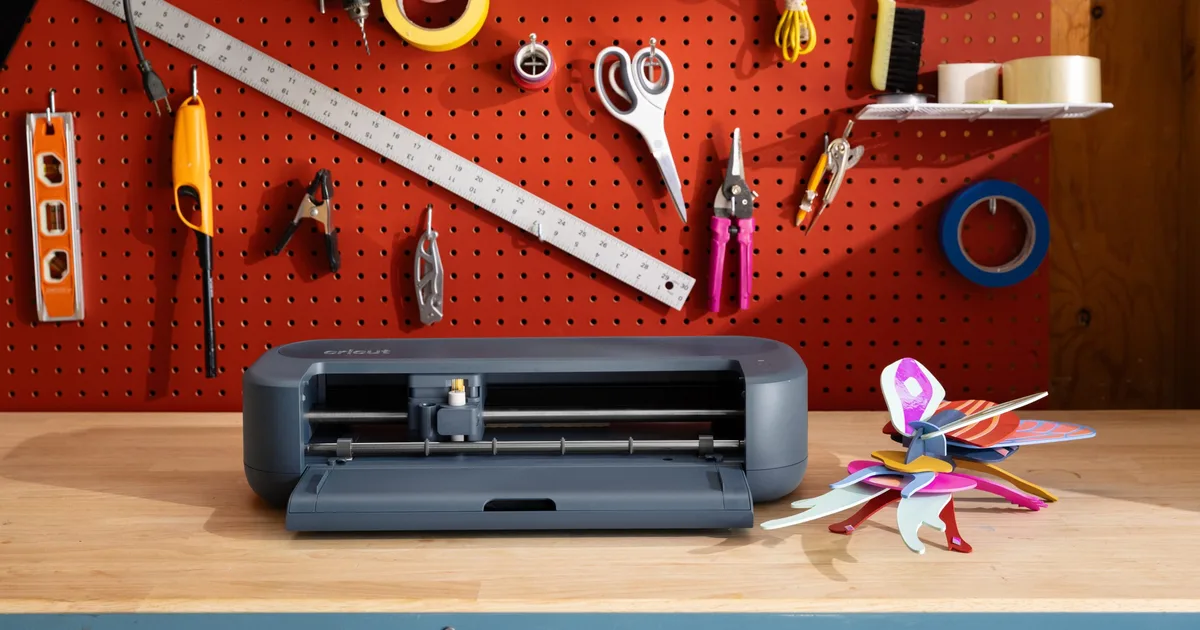
Image: Cricut
This post covers what Cricut has published and what it means for someone who mostly cuts heat transfer vinyl for shirts. It also covers when a cutter is the wrong tool entirely.
Cricut Maker 5 Specs
| Specification | Cricut Maker 5 |
|---|---|
| Announced | September 3, 2026 (South Jordan, Utah) |
| On sale | September 4, 2026 |
| Starting price | $349 (bundles) |
| Launch retail | Cricut.com and Michaels exclusive for the first two weeks |
| Colors | Slate Blue (Cricut.com); Teal (Michaels exclusive) |
| Cutting width | 12 inches |
| Maximum material thickness | 3 mm (Cricut says 25 percent more than the previous 2.4 mm) |
| Size | About 30 percent more compact than previous Maker models |
| Compatible tools | 13 (cutting, writing, drawing, foiling, scoring, debossing, embossing, engraving) |
| Compatible materials | 300+ including vinyl, iron-on, cardstock, fabric, leather, wood, acrylic |
| New in this generation | Updated engraving tool, new scoring tool, faster Load & Go workflows, snap-in pen holder |
| Print Then Cut | Supported |
| Ultimate Bundle | Adds the Engraving Tip, Knife Blade, Deep Point Blade, and Rotary Blade |
| Cutting speed | Not published in the launch materials |
| Ultimate Bundle price | Not published in the launch release |
Cricut CEO Ashish Arora said the Maker 5 "is about giving people the confidence and capability to make more of what they imagine." The machine runs on Cricut's Design Space software. Cricut says its library holds more than 1.75 million images and 1,500 fonts, and many of them require a Cricut Access subscription.
What Changed for Shirt Makers
Most of the Maker 5's upgrades target crafters working in thick or rigid materials: the 3 mm cut depth, the updated engraving tool, and the new scoring tool. Heat transfer vinyl is a thin film on a carrier sheet. Every Cricut Maker and Explore generation has cut it cleanly with the standard fine point blade.
Three things a t-shirt maker will notice:
- Footprint. A machine 30 percent smaller is easier to keep next to a heat press in a spare room or a small shop.
- Load & Go workflow. Cricut says loading is faster. That matters when a batch of shirts means cutting and weeding a dozen sheets of HTV in a row.
- Print Then Cut. This is still supported, but it relies on a home inkjet printer and printable iron-on sheets. That is a different product with different durability from the full-color transfers shirt businesses sell.
What does not change: weeding time, the need for a heat press or EasyPress, and the one-color-per-layer nature of HTV. A five-color design is still five cuts, five weeds, and a layered press. Our Cricut for t-shirts beginner guide walks through that full workflow.
Maker 5 vs Staying on a Maker 4 or Explore
For someone who already owns a Maker 4, Maker 3, or an Explore machine and uses it mainly for HTV, the Maker 5 does not cut vinyl any better. The upgrade makes sense for makers who also want to engrave, score thicker board, or cut 3 mm materials. It also suits anyone buying a first machine who wants the current flagship.
A shirt-only maker should compare the Maker 5 against Cricut's Explore line. The Explore machines handle HTV, adhesive vinyl, paper, and cardstock, which covers everything most shirt work needs. Our HTV buying guide lists which vinyl brands cut well on Cricut blades. Makers outgrowing a 12-inch machine can look at the Siser Juliet and Romeo cutters, which are built around HTV production.
When a Cutter Is the Wrong Tool
A Cricut is the right tool for one- and two-color text, names and numbers, and simple logos. It is the wrong tool for full-color art, gradients, photos, and anything with fine detail that would take an hour to weed.
For those designs, shirt makers typically order DTF transfers. A DTF transfer arrives printed in full color with the adhesive already applied. There is nothing to cut or weed; it is placed on the shirt and pressed. Our DTF transfer beginner FAQ explains how they work, and the iron-on transfers buying guide compares DTF, HTV, and iron-on paper side by side.
Many small shops run both: HTV from the Cricut for names and quick one-offs, DTF transfers for full-color designs. Cricut's own presses handle both. See our Cricut EasyPress SE breakdown for DTF press settings on Cricut heat presses, and the Cricut AutoPress review for the clamshell option.
Frequently Asked Questions
When did the Cricut Maker 5 come out?
Cricut announced the Maker 5 on September 3, 2026, and it went on sale September 4, 2026. For the first two weeks it was available only through Cricut.com, in Slate Blue, and Michaels stores, in an exclusive Teal. Cricut said other online and in-store retailers would follow.
How much does the Cricut Maker 5 cost?
Cricut lists Maker 5 bundles starting at $349. An Ultimate Bundle adds the Engraving Tip, Knife Blade, Deep Point Blade, and Rotary Blade. Cricut's launch release did not state that bundle's price, so check Cricut.com or Michaels for current pricing.
Can the Cricut Maker 5 cut iron-on vinyl for shirts?
Yes. Iron-on (heat transfer vinyl) is among the 300-plus materials Cricut lists for the Maker 5. It cuts HTV with the standard fine point blade the same way earlier Maker and Explore machines do. The design still has to be weeded and pressed with a heat press or EasyPress.
Is the Cricut Maker 5 worth upgrading from a Maker 4 for HTV?
For HTV alone, no. The main upgrades are 3 mm cutting depth, engraving and scoring tools, a smaller body, and faster loading. None of them change how vinyl cuts. The Maker 5 is worth it for makers who also want thicker materials or engraving, or who are buying their first machine.
Do I need a Cricut to use DTF transfers?
No. DTF transfers arrive printed with adhesive already applied, so there is nothing to cut or weed. They need only a heat press or a capable handheld press set to the transfer supplier's temperature, time, and pressure. A Cricut is useful alongside DTF for names, numbers, and one-color add-ons.
Where It Fits in the DTF Database
Cricut's company profile is in our supplier directory. For press settings by fabric, use the DTF temperature and time chart. For sizing designs on adult and youth shirts, use the placement guide. If the goal is full-color shirts without weeding, start with the DTF transfer sourcing guide.
About the Author
DTF Database Founder
Darrin DeTorres has over 10 years of experience in the print industry, specializing in screen printing, sublimation, embroidery, HTV, and DTF printing. He runs Notice Me Marketing and Media, a custom apparel production company that prints thousands of shirts per month.
More from Equipment Reviews
Brother's DTRX100 prints 31.5 in wide with 4 piezo heads and ships with a powder applicator and dryer. Dealer price $39,995. Full specs and install needs.
MagicSeal is a finishing sheet or spray pressed over DTF prints for a softer hand. Prices from $18, application steps, and the wash claims to test.
We bought a $2,500 automatic two station pneumatic heat press from Upload Transfers. Output went from about 30 shirts an hour to about 70. What to know first.
Explore DTF Database
Browse and compare 20+ verified DTF printer models by price, features, and specifications.
Read moreCalculate your per-print costs, profit margins, and ROI for DTF printing.
Read moreBrowse verified DTF suppliers for ink, film, powder, and equipment.
Read moreFind DTF transfer suppliers shipping to your state, with verified turnaround times.
Read moreMetro-level DTF supplier guides for Los Angeles, NYC, Dallas, Houston, and more.
Read moreStep-by-step guide to the DTF printing process with temperatures and troubleshooting.
Read more