
Cricut EasyPress SE for DTF Transfers: Specs and Price
Cricut launched the EasyPress SE on February 6, 2026 at $99 for the 9x9 and $119 for the 12x10, with 400°F max heat and DTF listed as a supported material.
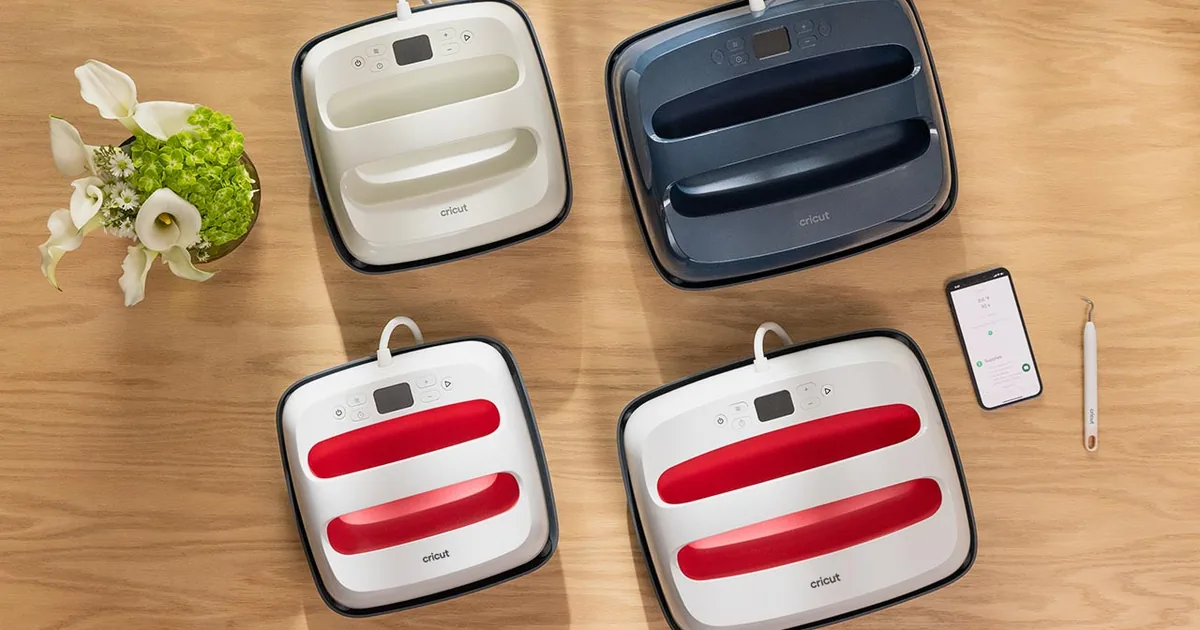
Image: Cricut, Inc.
This article covers the published specifications, how the SE differs from the EasyPress 3, and the honest answer to whether a handheld press is enough for DTF transfers.
EasyPress SE Specifications
| Specification | 9 x 9 (Standard) | 12 x 10 (Large) |
|---|---|---|
| Price (USD) | $99 | $119 |
| Maximum temperature | 400°F (205°C) | 400°F (205°C) |
| Heat plate | Ceramic-coated, edge-to-edge heat | Ceramic-coated, edge-to-edge heat |
| Controls | Manual digital buttons | Manual digital buttons |
| Bluetooth | No | No |
| Safety | Insulated base, auto-off | Insulated base, auto-off |
| Colors | Raspberry, Taupe, Daybreak | Raspberry, Slate Blue, Daybreak |
| Supported materials (per Cricut) | Iron-on (HTV), Infusible Ink, sublimation, DTF | Same |
Daybreak is a Walmart-exclusive color in both sizes. Cricut has not published heat-up time, weight, or wattage for the SE. It is sold at Cricut.com, Michaels, and Walmart in the US and Canada, with other countries to follow.
EasyPress SE vs EasyPress 3
Cricut describes the SE as having "the same pro-grade heating plate and manual digital controls" as the EasyPress 3. The difference is connectivity. The EasyPress 3 pairs with the Cricut Heat app over Bluetooth and receives time and temperature settings from the phone. The SE has no radio; the user looks up settings in the Cricut Heat Guide on the web or in the app and keys them in with the buttons on the press. For DTF that is no loss, because the Heat Guide's DTF settings are generic and most transfer suppliers publish their own.
The SE effectively replaces the EasyPress 2 at the entry price point. Our Cricut AutoPress review covers the top of Cricut's range and already lists the SE as the budget alternative.
Can the EasyPress SE Press DTF Transfers?
Cricut says yes, and on the temperature side it is right. Most DTF transfers press at 300 to 325°F on cotton for 10 to 15 seconds with medium to firm pressure, per our DTF temperature and time chart, and the SE's 400°F ceiling covers every fabric on that chart.
Pressure is the problem. DTF adhesive needs the film pushed hard and evenly into the fabric so the melted powder locks into the weave. A clamshell press applies that with a lever and a locked platen. A handheld press applies whatever the user's arms apply, and it varies across the plate and across the 15 seconds. That is why handheld presses show up in our transfer not sticking troubleshooting guide more often than any other cause.
For an occasional shirt, the SE works if the user compensates:
- Press on a hard, flat surface. Use a Cricut pressing mat or a firm board on a table, never an ironing board or a folded towel.
- Pre-press the garment for 5 seconds to remove moisture and flatten the weave.
- Lean in with both hands and keep the plate still for the full dwell time. Rocking or sliding the press lifts the edges.
- Press designs smaller than the plate. A 12 x 10 plate cannot evenly press a 12 x 14 back print; overlapping presses leave a visible seam in the adhesive.
- Peel per the transfer's instructions, then cover with parchment and press a second time for 5 to 10 seconds to set the ink.
Our heat press step-by-step guide covers the general technique, and the iron vs heat press vs auto press guide explains why pressure matters more than temperature for DTF.
Who Should Buy It
The SE makes sense for a crafter who presses a few DTF or HTV pieces a month, already owns a Cricut cutter, and wants a small press that stores in a drawer. It is the right press for kids' shirts, tote bags, and the projects in our Cricut t-shirt beginner guide.
It is the wrong press for anyone selling shirts. At 20 or more transfers a month the inconsistency costs more in reprints than a $200 to $300 clamshell costs to buy. Our heat press buying guide lists the entry-level clamshells that solve the pressure problem, and the heat press temperature and time settings guide covers the settings once you have one.
October 2026 update: For shoppers who want automatic pressure instead of a handheld press, Cricut's AutoPress 2 also lists DTF transfers. It has a 15 x 15 inch plate, starts at $349 per the press release, and reaches more retailers on Nov. 4, 2026.Frequently Asked Questions
How much is the Cricut EasyPress SE?
The Cricut EasyPress SE lists at $99 for the 9 x 9 inch size and $119 for the 12 x 10 inch size in the United States. It launched February 6, 2026 at Cricut.com, Michaels, and Walmart.
Can you use DTF transfers with a Cricut EasyPress SE?
Yes. Cricut lists DTF as a supported material and the SE reaches 400°F, above the 300 to 325°F most DTF transfers require. Because it is handheld, apply firm, steady, two-handed pressure on a hard surface for the full 10 to 15 seconds, and keep designs smaller than the plate.
What is the difference between the EasyPress SE and EasyPress 3?
The EasyPress SE has the same ceramic-coated heat plate and manual digital controls as the EasyPress 3 but no Bluetooth, so settings are entered by hand instead of sent from the Cricut Heat app. The SE launched at $99 and $119, well below the EasyPress 3's list prices.
What temperature should I set the EasyPress SE for DTF?
Follow the transfer supplier's instructions first. As a general range, DTF transfers on 100% cotton press at 300 to 325°F for 10 to 15 seconds with firm pressure, and blends and polyester press cooler. Our DTF temperature and time chart lists every common fabric.
Related Resources
See the best heat press for shirts guide for the next step up, and the iron-on transfers vs DTF vs HTV guide if you are deciding which transfer type to press with it.
Also from Cricut (Oct. 13, 2026): The StickerPix Print + Cut ($299) and StickerPix Print ($169) sticker printers launched Sept. 24, 2026. They print stickers and photos only, not transfers. See the Cricut StickerPix specs and price guide.Tags
About the Author
DTF Database Founder
Darrin DeTorres has over 10 years of experience in the print industry, specializing in screen printing, sublimation, embroidery, HTV, and DTF printing. He runs Notice Me Marketing and Media, a custom apparel production company that prints thousands of shirts per month.
More from Equipment Reviews
Explore DTF Database
Browse and compare 20+ verified DTF printer models by price, features, and specifications.
Read moreCalculate your per-print costs, profit margins, and ROI for DTF printing.
Read moreBrowse verified DTF suppliers for ink, film, powder, and equipment.
Read moreFind DTF transfer suppliers shipping to your state, with verified turnaround times.
Read moreMetro-level DTF supplier guides for Los Angeles, NYC, Dallas, Houston, and more.
Read moreStep-by-step guide to the DTF printing process with temperatures and troubleshooting.
Read more