
xTool Apparel Printer Plus: DTF Specs, Price, Upgrades
xTool's Apparel Printer Plus is a $5,399 one-click DTF printer with dual Epson I1600 heads, a built-in humidifier, and wet capping. Specs, bundles, limits.
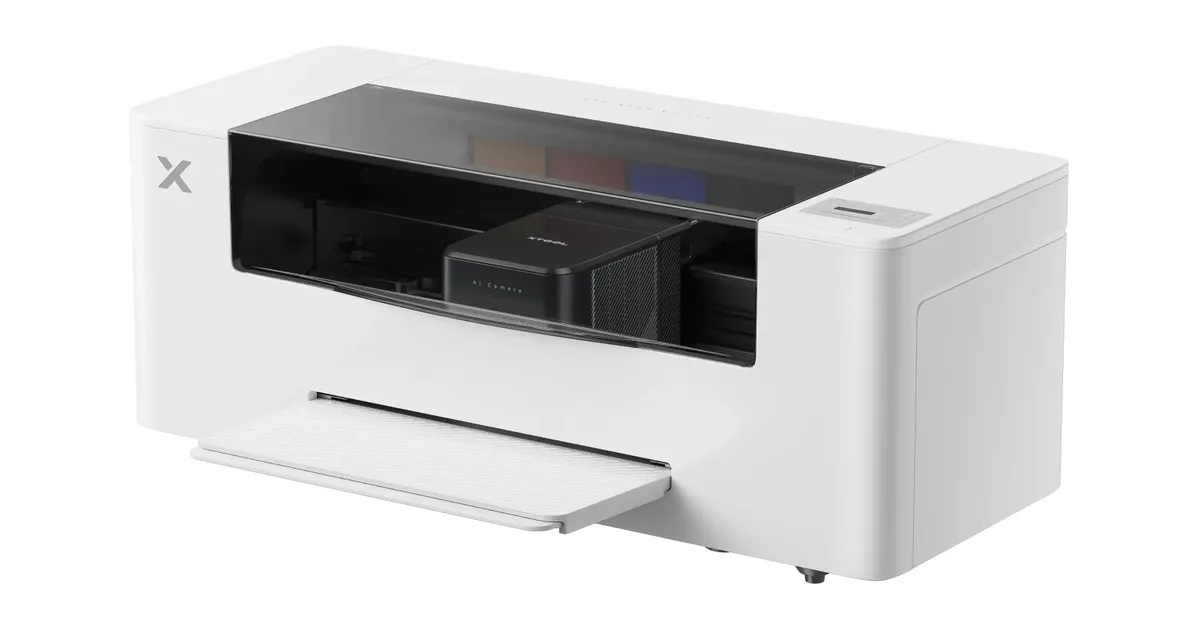
Image: xTool
The original xTool Apparel Printer launched on Kickstarter in March 2025. The Plus does not change what the machine is. It is a sheet-fed desktop DTF printer built to work with xTool's own shaker oven, aimed at makers and small shops that want to print their own transfers without learning a separate RIP, powder shaker, and curing routine.
xTool Apparel Printer Plus specs
| Spec | xTool Apparel Printer Plus |
|---|---|
| Printheads | Two Epson I1600 (one color, one white) |
| Ink channels | CMYK + WWWW |
| Print width | 14 in (356 mm) |
| Maximum print area | Listed as 14 x 18 in; the metric figure beside it reads 356 x 600 mm |
| Resolution | 720 x 1800 dpi |
| Minimum drop size | 3.8 pL |
| Speed | Up to 50 sq ft/hr at 720 x 1200 dpi (xTool figure) |
| Media handling | Single sheet-fed; printed film is cut into sheets automatically |
| Software | xTool's own app with RIP, auto nesting, layout, and machine control |
| Platforms | Windows, macOS, iOS, Android |
| Size and weight | 35.63 x 14.37 x 14.03 in; 61.73 lb |
| Power | 350 W printing; 23.5 W sleep (about 0.5 kWh per day) |
| Operating range | 59 to 89°F and 30 to 80% RH (68 to 89°F and 50 to 80% RH recommended) |
| Warranty | 12 months on the printer and shaker oven in most regions; 6 months on one printhead |
What changed from the original Apparel Printer
xTool describes the Plus as the same workflow with better printhead care. According to the product page, the upgrades are:
- Built-in humidifier. A sensor turns on an ultrasonic humidifier when humidity inside the printer drops and turns it off at a target level. Low humidity is one of the most common causes of white ink clogs in DTF, so this upgrade matters most in dry climates and heated winter shops.
- Upgraded white ink damper and wet capping. xTool calls the damper HydraFlow. Wet capping keeps the printheads moist while the printer sits idle.
- App monitoring. Owners can check printer status, get alerts, and send print jobs from the mobile app on the same local network.
The maintenance features carried over from the original are automatic printhead cleaning, white ink stirring and circulation, AI-camera printhead calibration, and nozzle checks. If a nozzle stays clogged after cleaning, the printer compensates with working nozzles.
xTool is sending existing Apparel Printer owners a free upgrade kit with an internal humidity module and a white ink damper upgrade, redeemed with a code sent to the purchase email. Shipping fees may apply.
Price and bundles
| Package | MSRP | Sale price on Sept 29, 2026 |
|---|---|---|
| Standalone printer | $5,399 | $4,999 |
| Versatile Bundle | $8,099 | $7,399 |
| All-in-1 Bundle | $8,999 | $7,499 |
The sale was part of xTool's sixth anniversary promotion and had a countdown running into early October, so expect list prices to return. xTool also sells xToolCare coverage at $539 for one year or $759 for two years at list price. Its store lists a 14-day return policy and a 60-day price guarantee, and it includes a free installation visit from an independent, xTool-certified host.
Consumables on the same page: a film roll is $129 and a 1 kg bag of powder is $39.
The one-click workflow depends on xTool's oven
The one-click print, powder, shake, and bake cycle only works with xTool's own shaker oven. The printer cuts the printed film into sheets and sends them along a track into the oven, which applies powder while the ink is wet and bakes both sides of the sheet.
Two limits come with that design. xTool says third-party film cannot be used with its OS1 shaker oven, and it does not recommend third-party ink. Third-party film is fine only if you powder and cure by hand. For a shop that wants to shop around for film and powder, that lock-in is the main trade-off against open roll-fed printers.
xTool's pressing settings
xTool's FAQ gives specific settings for its warm-peel film:
- Pre-press the garment for 6 seconds.
- Press at 320°F (160°C) for 6 seconds at more than 0.7 MPa of pressure.
- Move the garment somewhere cooler for 10 to 20 seconds, then peel.
- Press a second time at the same settings. For large designs, xTool suggests a third press with the top and bottom of the design each moved to the center of the platen.
Those times are shorter than most DTF supplier instructions, which usually run 10 to 15 seconds. Follow the film maker's settings for whatever film you actually use. Our DTF temperature and time chart has fabric-by-fabric defaults for standard films.
How it compares
The closest direct competitor is the OMTech Aurora D1 Pro, which also uses two Epson I1600 heads rated at 50 sq ft/hr. The OMTech is roll-fed on 15-inch film and sells its shaker and dryer as a bundle, while the xTool is sheet-fed and cuts sheets automatically on the way into its oven. At the other end of the market, the Procolored F13X is an A3 dual-XP600 printer at $2,999, and the HTVRONT D2 competes on price for hobby buyers.
Whether a $5,000 to $7,500 printer makes sense at all depends on volume. Our buy a printer or order transfers breakdown runs the break-even math, and most shops pressing fewer than a few dozen shirts a week come out ahead ordering gang sheets.
Frequently asked questions
How much does the xTool Apparel Printer Plus cost?
xTool lists the Apparel Printer Plus at $5,399 for the printer alone, $8,099 for the Versatile Bundle, and $8,999 for the All-in-1 Bundle. On September 29, 2026 an anniversary sale had those at $4,999, $7,399, and $7,499.
What is the difference between the xTool Apparel Printer and the Plus?
The Plus keeps the same dual Epson I1600 heads, 14-inch width, and one-click workflow. It adds a built-in humidifier, an upgraded white ink damper, wet capping, and app alerts and job sending. Original owners can claim a free upgrade kit with a humidity module and a damper upgrade.
Can you use third-party film or ink with the xTool Apparel Printer Plus?
xTool does not recommend third-party ink because of clogging risk. Third-party film works only if you apply powder and cure by hand. The OS1 shaker oven that runs the one-click workflow does not accept third-party film.
What heat press settings does xTool recommend?
xTool's FAQ says to pre-press for 6 seconds, press at 320°F (160°C) for 6 seconds, let the garment cool for 10 to 20 seconds, peel, and press again at the same settings. It recommends more than 0.7 MPa of pressure.
What warranty comes with the xTool Apparel Printer Plus?
The printer and shaker oven carry a 12-month warranty in most regions and 24 months in Europe. Printhead coverage is 6 months for a single printhead. xToolCare plans add one or two years of extended coverage.
Where it fits in the DTF Database
The xTool Apparel Printer Plus is listed in the DTF printer directory with the specs above. For more options at this budget, see our beginner DTF printer guide, and for the press you will need alongside it, the heat press buying guide.
Tags
About the Author
DTF Database Founder
Darrin DeTorres has over 10 years of experience in the print industry, specializing in screen printing, sublimation, embroidery, HTV, and DTF printing. He runs Notice Me Marketing and Media, a custom apparel production company that prints thousands of shirts per month.
More from Equipment Reviews
M&R's QUATRO is a 24-inch DTF system with four or six Epson i3200 heads, 90 linear ft/hr, and a matched powder dryer. Specs, cutters, and what M&R includes.
Explore DTF Database
Browse and compare 20+ verified DTF printer models by price, features, and specifications.
Read moreCalculate your per-print costs, profit margins, and ROI for DTF printing.
Read moreBrowse verified DTF suppliers for ink, film, powder, and equipment.
Read moreFind DTF transfer suppliers shipping to your state, with verified turnaround times.
Read moreMetro-level DTF supplier guides for Los Angeles, NYC, Dallas, Houston, and more.
Read moreStep-by-step guide to the DTF printing process with temperatures and troubleshooting.
Read more