
DTF Ghosting: Why You Get a Double Image and How to Fix It
DTF ghosting is a faint double or shadow image, usually from film shifting when the press opens or during peel. The causes, fixes, and how to tell them apart.
Press ghosting or print ghosting? Check the film first
Before changing any settings, hold the printed film up to the light before pressing, or look at a spare copy from the same run.
- The film is sharp, but the shirt shows a double image. The ghost happened at the press or during the peel. This is the common case, and the rest of this guide covers it.
- The film already shows a double edge, a color halo, or offset white. The problem is at the printer: bidirectional alignment, printhead height, or a white layer that does not line up with the color layer. Run the printer's alignment routine and see our printer troubleshooting guide and white ink troubleshooting.
Why DTF transfers ghost at the press
The adhesive on a DTF transfer is a thermoplastic powder. At press temperature it melts and grips the fabric, and it stays soft until it cools. Anything that slides the film even a millimeter while the adhesive is soft lays down a faint second image. The usual causes:
- The film lifts when the press opens. On a clamshell press the upper platen can drag the film up and sideways as it rises, especially if the heat pad is sticky or the film is thin. Static and a teflon sheet that sticks to the film make it worse.
- The garment moves after pressing. Pulling a hot shirt off the platen with the film still on it lets the film shift against soft adhesive.
- Peeling too early, or peeling hot film cold-style. A cold-peel film peeled while still warm, or any film peeled slowly at a low angle, can drag ink across the fabric. See our film types guide for how hot, warm, and cold peel films differ.
- Too much pressure on a thick or uneven garment. Seams, zippers, and thick fleece let the film roll or slide under heavy pressure. Our guide to pressing over seams, zippers, and pockets covers pressing pillows and risers.
- Moisture in the garment. Skipping the pre-press leaves steam in the fabric, and the steam lifts the film off the shirt during the press.
- An uneven or misadjusted platen. If one side of the press closes first, it can push the film sideways as it closes.
How to stop DTF ghosting
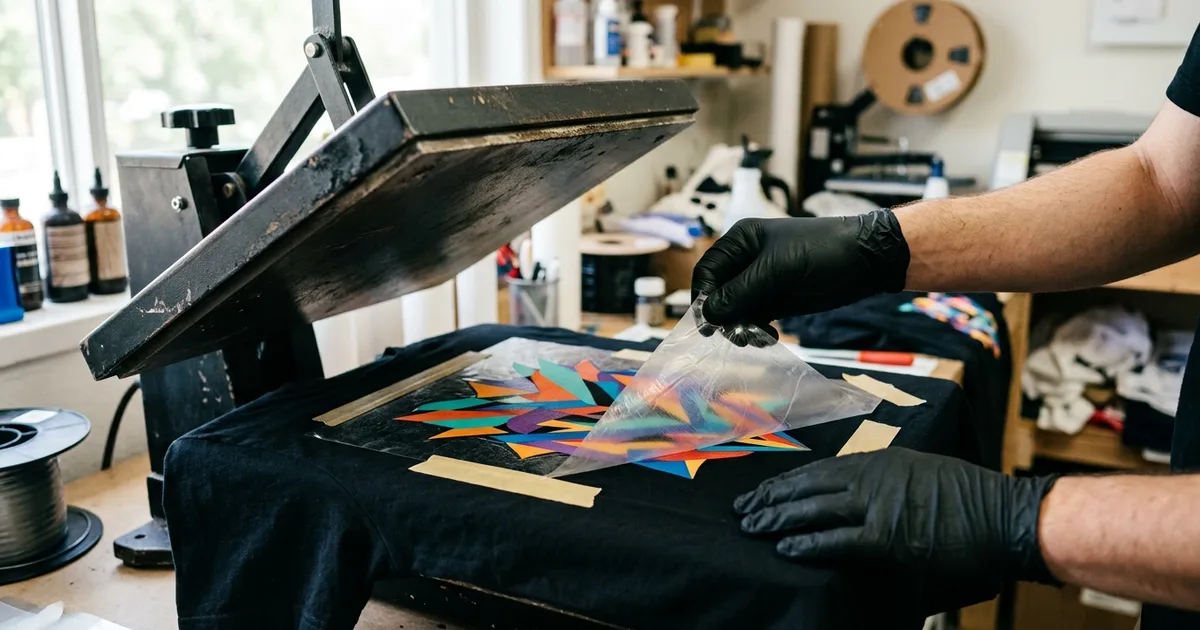
- Tape the film down. Two or three strips of heat-resistant tape at the corners is the single most reliable fix. It costs almost nothing and stops the film from moving whether the cause is the platen, static, or your hands.
- Pre-press the garment for a few seconds to drive out moisture and flatten wrinkles before placing the transfer.
- Open the press smoothly and let the film settle. On a clamshell, open it fully in one motion, then leave the garment on the platen until you peel. On a swing-away or draw press this problem is less common because the upper platen lifts straight up.
- Peel according to the film type. For cold peel, wait until the film is fully cool to the touch. For hot or warm peel, peel in one smooth motion at a low angle close to the fabric, without stopping partway.
- Replace sticky cover sheets and clean the upper platen. Adhesive residue on a teflon sheet or heat pad grabs the film as the press opens.
- Use the pressure and temperature on the transfer's instructions. Excess pressure on soft garments and excess heat both keep the adhesive soft for longer. Our DTF temperature and time chart has fabric-specific starting points.
- Check your platen. Close the press on a sheet of paper at each corner and pull. If one corner pulls out easily, the pressure is uneven, and a heat press buying guide will help you judge whether it is worth repairing or replacing.
Can a ghosted DTF print be fixed?
Usually not completely. Once ink and adhesive transfer to the fabric in two places, the ghost layer is bonded. A re-press with a cover sheet can soften a very light ghost slightly, but it will not remove it, and repeated pressing can dull the colors or cause dye migration on polyester. Count a ghosted shirt as a misprint and change the process before the next one.
Other DTF problems that look like ghosting
| What you see | More likely cause | Guide |
|---|---|---|
| Blurry, dull colors with no offset copy | Underpowered white layer or wrong color profile | Faded, dull DTF prints |
| Parts of the design stay on the film | Too little heat, time, or pressure | DTF transfer not sticking |
| Film will not release and the print looks gummy | Under-cured powder or wrong peel temperature | DTF film not peeling |
| Colored haze around the design on polyester | Dye migration from the fabric | Dye migration fix |
Frequently asked questions
What causes ghosting on DTF transfers?
Ghosting happens when the transfer film shifts while the adhesive is still soft, so ink lands on the fabric in two slightly different places. The most common triggers are the film lifting as a clamshell press opens, moving the garment before peeling, and peeling too early or at a steep angle.
How do I stop my DTF transfers from ghosting?
Tape the film to the garment with heat-resistant tape, pre-press to remove moisture, open the press in one smooth motion, and leave the garment on the platen until you peel. Peel according to the film type: fully cool for cold peel, one smooth low-angle pull for hot peel.
Is DTF ghosting caused by the printer or the heat press?
Check the printed film before pressing. If the film is sharp and only the shirt shows a double image, the cause is at the press or the peel. If the film itself shows a double edge or offset white, the printer needs a printhead alignment.
Can you fix a DTF shirt that already has ghosting?
Not reliably. The ghost image is bonded into the fabric with the adhesive, so re-pressing will not remove it and extra pressing can dull the colors. Treat the shirt as a misprint and fix the cause before pressing the next one.
Does heat tape really prevent DTF ghosting?
Yes, for press-caused ghosting it is the most reliable single fix, because it holds the film in place while the press opens and while you peel. It does not help with ghosting that comes from printhead misalignment at the printer.
Where it fits in the DTF Database
Ghosting is one of several press-side problems covered in our DTF heat press tips. If you buy transfers rather than print them, most suppliers in the DTF supplier directory print their own peel type and press settings on the order, and following those exactly prevents most ghosting.
Tags
About the Author
DTF Database Founder
Darrin DeTorres has over 10 years of experience in the print industry, specializing in screen printing, sublimation, embroidery, HTV, and DTF printing. He runs Notice Me Marketing and Media, a custom apparel production company that prints thousands of shirts per month.
More from DTF Basics
Standard sublimation washes out of cotton. Here is what works instead in 2026: cotton primers, sublimation HTV, Sawgrass VersiFlex, blends, and DTF.
Explore DTF Database
Browse and compare 20+ verified DTF printer models by price, features, and specifications.
Read moreCalculate your per-print costs, profit margins, and ROI for DTF printing.
Read moreBrowse verified DTF suppliers for ink, film, powder, and equipment.
Read moreFind DTF transfer suppliers shipping to your state, with verified turnaround times.
Read moreMetro-level DTF supplier guides for Los Angeles, NYC, Dallas, Houston, and more.
Read moreStep-by-step guide to the DTF printing process with temperatures and troubleshooting.
Read more