How to Design T-Shirts: A Step-by-Step Guide From Idea to Print-Ready File
How to design t-shirts: pick the message, choose free or paid software, set a 300 DPI canvas at print size, place it right and export a transparent PNG.
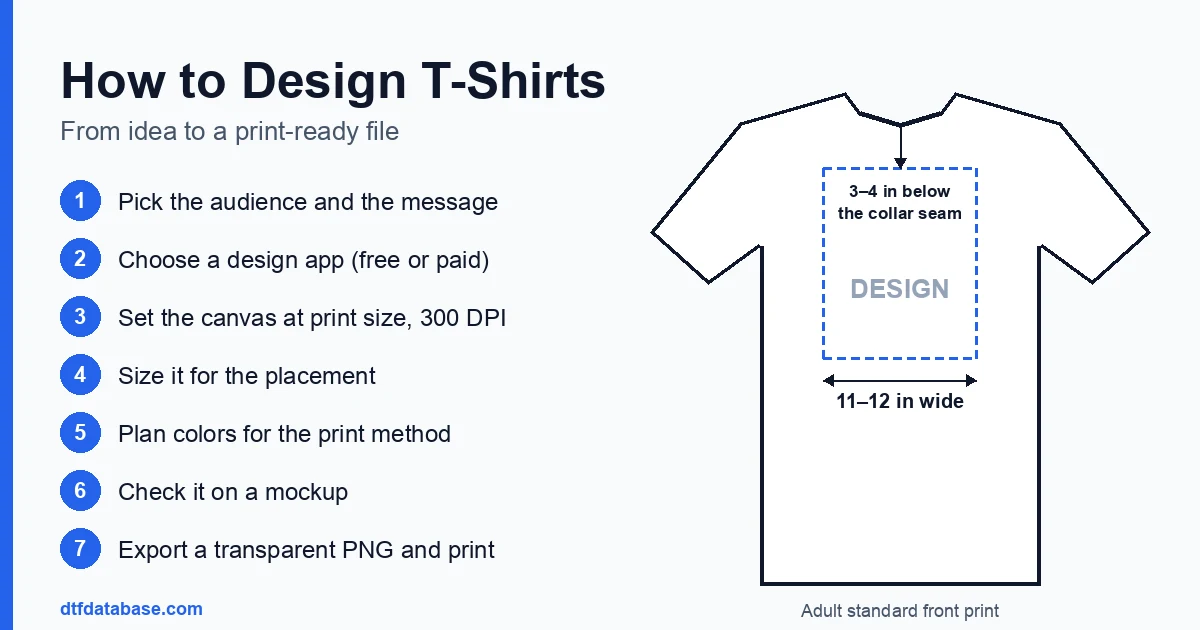
How to design a t-shirt: quick answer
- Pick the audience and the message. A team, a business, an event, a niche or a joke: the audience decides the style, the sizes and the shirt color.
- Choose a design app. Free options include Affinity, Inkscape, GIMP and Canva's free plan; Adobe Illustrator and Photoshop are the paid standard.
- Set the canvas at the print size. Work in inches at 300 DPI, with a transparent background, so a 12-inch-wide print is 3,600 pixels wide.
- Size the design for its placement. An adult standard front print is 11 to 12 inches wide and starts 3 to 4 inches below the collar seam; a left chest logo is 3.5 to 4 inches wide.
- Plan the colors for the print method. DTF prints unlimited colors in one pass; screen printing needs one screen per color; heat transfer vinyl needs one layer per color.
- Check it on a mockup. Place the art on a photo or template of the actual blank and shirt color before ordering anything.
- Export and print. Export a transparent PNG at print size, confirm the rights to every element, then order transfers from a DTF supplier or a local shop.
The rest of this guide covers each step in more detail, with links to the DTF Database guides that go deeper on software, file setup and placement.
Start with the concept and the audience
A t-shirt design starts with a decision about who will wear it and why. A youth soccer team, a family reunion, a coffee shop's staff, a 5K fundraiser and a streetwear brand each need different things. The audience decides:
- The message. One idea per shirt reads best from a distance. A shirt is usually seen for a few seconds, across a room or a street.
- The style. Bold condensed lettering suits sports and streetwear; a small, clean logo suits staff shirts; illustration and full-color art suit merch and gifts.
- The sizes. Youth runs, adult runs and 2XL-plus runs all change how large the print can be. See the sizing section below.
- The shirt color. Light and dark shirts change which design colors stand out, and a heather or colored blank changes how a mockup should be judged.
Writing a one-line brief helps: "Front print, team name and year, two colors, black and white shirts, youth and adult sizes." It settles most later decisions before any software is opened. For idea starters by theme, see the DTF design ideas and inspiration guide, and for business shirts, the company t-shirt design guide.
Free and paid t-shirt design software
Most t-shirt designs mix two kinds of artwork. Vector art (logos, lettering, badges, flat illustrations) is built from paths and stays sharp at any size. Raster art (photos, painted textures, AI-generated images) is built from pixels and loses quality when enlarged. The vector vs. raster guide explains the difference in detail. The right app depends on which kind of art the design uses.
| App | Cost | Type | Good fit for |
|---|---|---|---|
| Affinity (by Canva) | Free; Canva AI tools need a paid Canva plan | Vector, raster and layout in one app | One free app for both logos and photos |
| Inkscape | Free, open source | Vector | Logos, lettering, tracing a raster logo |
| GIMP | Free, open source | Raster | Photo cleanup, background removal, halftones |
| Canva | Free plan; transparent PNG download is a paid-plan feature | Template-based layout | Quick text and template designs |
| Adobe Illustrator / Photoshop | Subscription | Vector / raster | The industry-standard pair most print shops accept natively |
Details on each free option:
- Affinity has been free since October 29, 2025, when Canva relaunched it as one app combining photo editing, vector drawing and page layout. The Affinity free guide covers what is included and how to export for DTF.
- Inkscape is a free vector editor for Windows, macOS and Linux. The Inkscape for DTF guide walks through document size, line weights, text and a transparent 300 DPI export.
- GIMP is a free raster editor; version 3.2 added vector layers and better PSD import. The GIMP 3.2 for DTF guide covers background removal and halftones.
- Canva works for text and template layouts, but a transparent-background download requires a paid plan. The Canva shirt design guide covers canvas size and export.
A common problem is a customer or club logo that only exists as a small, blurry JPG. The free logo vectorizing guide shows how to trace it into clean paths with Inkscape's Trace Bitmap tool. For type, the streetwear fonts guide lists free fonts whose licenses allow printing on shirts that are sold.
Set up the file: 300 DPI, transparent PNG, print size
The file setup decides whether a design that looks sharp on screen also prints sharp on fabric. Three settings matter most:
- Resolution: 300 DPI at the final print size. A design printed 12 inches wide needs 3,600 pixels across; a 4-inch left chest logo needs 1,200. Enlarging a small image later does not add detail, so the canvas should be the right size from the start.
- Background: transparent. DTF printers lay white ink under every non-transparent pixel. A white background box prints as a white rectangle on the shirt. Semi-transparent pixels, such as soft shadows, glows and feathered edges, get partial white ink and can look blotchy, so they are best made solid or converted to a halftone dot pattern.
- Format: PNG. A transparent PNG is the standard upload format for DTF transfers. Each supplier's upload page lists any other formats it accepts.
As a starting point, the DTF artwork requirements guide lists a minimum line thickness of 1.5 pt and a minimum text size of 8 pt for sans-serif fonts and 10 pt for serif fonts. Each transfer supplier publishes its own limits, and those take priority for that supplier's orders. When in doubt, make thin lines and small text bolder.
Size and place the design
Placement measurements are where many first designs go wrong: a design that looks right on a laptop screen often ends up too small, too large or too low on the shirt. These are the DTF Database placement figures for an adult tee:
| Placement | Design width | Position |
|---|---|---|
| Standard front print | 11 to 12 in | Top of design 3 to 4 in below the collar seam |
| Oversized front print | 12 to 14 in | 2 to 3 in below the collar seam |
| Left chest logo | 3.5 to 4 in | 7 to 9 in down from the left shoulder seam |
| Full back print | 12 to 14 in | 3 to 4 in below the back collar seam |
| Upper back / yoke | 10 to 12 in | 2 to 3 in below the back collar seam |
| Sleeve print | 2 to 3 in | 1 to 1.5 in from the sleeve hem |
Youth shirts take smaller prints: a youth standard front print is 8 to 10 inches wide, and adult 2XL and larger can take 13 to 14 inches. A single design size across a run of youth and adult shirts can look oversized on the small sizes and undersized on the large ones, which is why many orders use two or three print sizes. The placement and size chart guide has the full adult, youth, hoodie and polo charts, and the placement calculator draws a chosen print size on a chosen shirt size so the proportions can be checked before ordering.
Color and print-method limits
The print method sets the color rules, so it helps to know the method before the colors are final.
- DTF transfers print the full design in one pass with CMYK plus white ink, so photos, gradients and any number of colors cost the same as one color. The limit is fine detail: very thin lines, tiny text and soft semi-transparent effects. DTF works on cotton, polyester and blends.
- Screen printing needs one screen per color, and each screen carries a setup fee. Designs with many colors get expensive, and photographic art needs halftone separations. Screen printing becomes the cheaper choice on large runs. The DTF vs. screen printing comparison covers setup cost, color limits and the volume where each one wins.
- Heat transfer vinyl (HTV) is cut from solid-color sheets and weeded by hand. Each extra color is another layer to cut, weed and press, so HTV suits one- and two-color names, numbers and simple logos. The DTF vs. HTV comparison covers cost, durability and detail.
Color on screen is not the same as color on fabric. Monitors show RGB light, while printers lay down ink, so bright screen colors can print duller. Designs meant for dark shirts need enough contrast against the fabric, and heathered blanks show some fabric texture through thin areas. The DTF color management guide covers proofing, and the heather fabric guide covers printing on heathered shirts.
Check the design on a mockup
A mockup is an image of the design placed on a photo or template of the shirt. It shows how the art reads at its real size against the real shirt color, which a flat design file on a white canvas does not. A useful mockup check:
- Uses a template of the actual blank style and color, not a generic white tee.
- Places the design at the measured width and distance from the collar, not just "somewhere on the chest."
- Is viewed at small size too, the way a shopper sees it in a listing or across a room.
Mockups are a preview, not a promise. Sellers on Etsy should note that, as of November 2026, Etsy requires most listings to include at least one unedited photo of the actual item; the Etsy unedited photo rule guide explains which listings qualify for an exception.
Licensing: what a design can and cannot use
A design is only sellable if its creator has the rights to everything in it. Characters, team and league logos, brand names, song lyrics and artwork found online are protected by copyright or trademark. Printing them without a license is infringement, even if the artwork was redrawn, changed or bought as a "commercial use" file from a third party. The licensed character and copyright guide explains the law in plain terms and what can be printed safely.
Fonts and clip art carry their own licenses. A free download does not always allow use on products that are sold; the license file or the source site states what is allowed. Original artwork, properly licensed stock, and fonts under licenses such as the SIL Open Font License avoid the problem. When a customer supplies a logo, confirming that they own it or have permission to use it is a standard step before printing.
Printing the finished design
Once the file is ready, there are three common ways to turn it into shirts:
- Order DTF transfers and press them. Upload the transparent PNG to a transfer supplier, or lay several designs on one gang sheet with the gang sheet calculator. The transfers are pressed onto blank shirts with a heat press; the DTF Database starting point for 100% cotton is 300–325°F for 10–15 seconds, and the DTF temperature and time chart lists other fabrics. The supplier's own instructions take priority. The design and print a t-shirt guide walks through pressing and the first wash.
- Use a local shop. The DTF transfers near me page lists suppliers with local pickup, which helps for rush jobs and for checking a print in person.
- Compare suppliers. The DTF supplier directory lists DTF transfer suppliers across the US and can be filtered by state.
For group and team orders, the bulk order design guide covers artwork specs, minimums by print method and how to avoid reprints.
Frequently Asked Questions
How do you design your own t-shirt for free?
Free design apps cover every step. Affinity, which has been free since October 2025, handles both vector and photo work; Inkscape handles vector logos and lettering; GIMP handles photo cleanup. Set the canvas to the print size at 300 DPI with a transparent background, design, and export a PNG. Canva's free plan works for layouts, but its transparent-background download requires a paid plan.
What size should a t-shirt design be?
On an adult tee, a standard front print is 11 to 12 inches wide with its top 3 to 4 inches below the collar seam, and a left chest logo is 3.5 to 4 inches wide. A youth standard front print is 8 to 10 inches wide. The DTF Database placement guide has charts for each placement and shirt size.
What resolution and file format does a t-shirt design need?
A t-shirt design should be 300 DPI at the final print size, saved as a PNG with a transparent background. A 12-inch-wide print therefore needs 3,600 pixels across. Vector files from Illustrator or Inkscape are exported to a PNG at that size, and each supplier's upload page lists any other formats it accepts.
What is the best software for designing t-shirts?
It depends on the artwork. Vector apps such as Inkscape, Affinity and Adobe Illustrator suit logos and lettering, because vector paths stay sharp at any size. Raster apps such as GIMP, Affinity and Photoshop suit photos and painted art. Affinity covers both and is free, which makes it a common single-app choice.
Can I put a character or brand logo on a t-shirt I sell?
Not without a license from the rights holder. Characters, team logos and brand names are protected by copyright or trademark, and selling shirts that use them without permission is infringement, even if the art was redrawn or bought from a third-party file seller. Original artwork and properly licensed fonts and stock avoid the issue.
How many colors can a t-shirt design have?
With DTF transfers, any number: the whole design prints in one pass, so a full-color photo costs the same as a one-color logo. Screen printing needs a separate screen and setup for each color, and heat transfer vinyl needs a separate cut layer for each color, so designs for those methods are usually kept to a few colors.
Tags
About the Author
DTF Database Founder
Darrin DeTorres has over 10 years of experience in the print industry, specializing in screen printing, sublimation, embroidery, HTV, and DTF printing. He runs Notice Me Marketing and Media, a custom apparel production company that prints thousands of shirts per month.
More from Tutorials
Explore DTF Database
Browse and compare 20+ verified DTF printer models by price, features, and specifications.
Read moreCalculate your per-print costs, profit margins, and ROI for DTF printing.
Read moreBrowse verified DTF suppliers for ink, film, powder, and equipment.
Read moreFind DTF transfer suppliers shipping to your state, with verified turnaround times.
Read moreMetro-level DTF supplier guides for Los Angeles, NYC, Dallas, Houston, and more.
Read moreStep-by-step guide to the DTF printing process with temperatures and troubleshooting.
Read more